
AI is transforming data visualization in 2026, making it faster, smarter, and easier for businesses to turn raw data into actionable insights. Here's how:
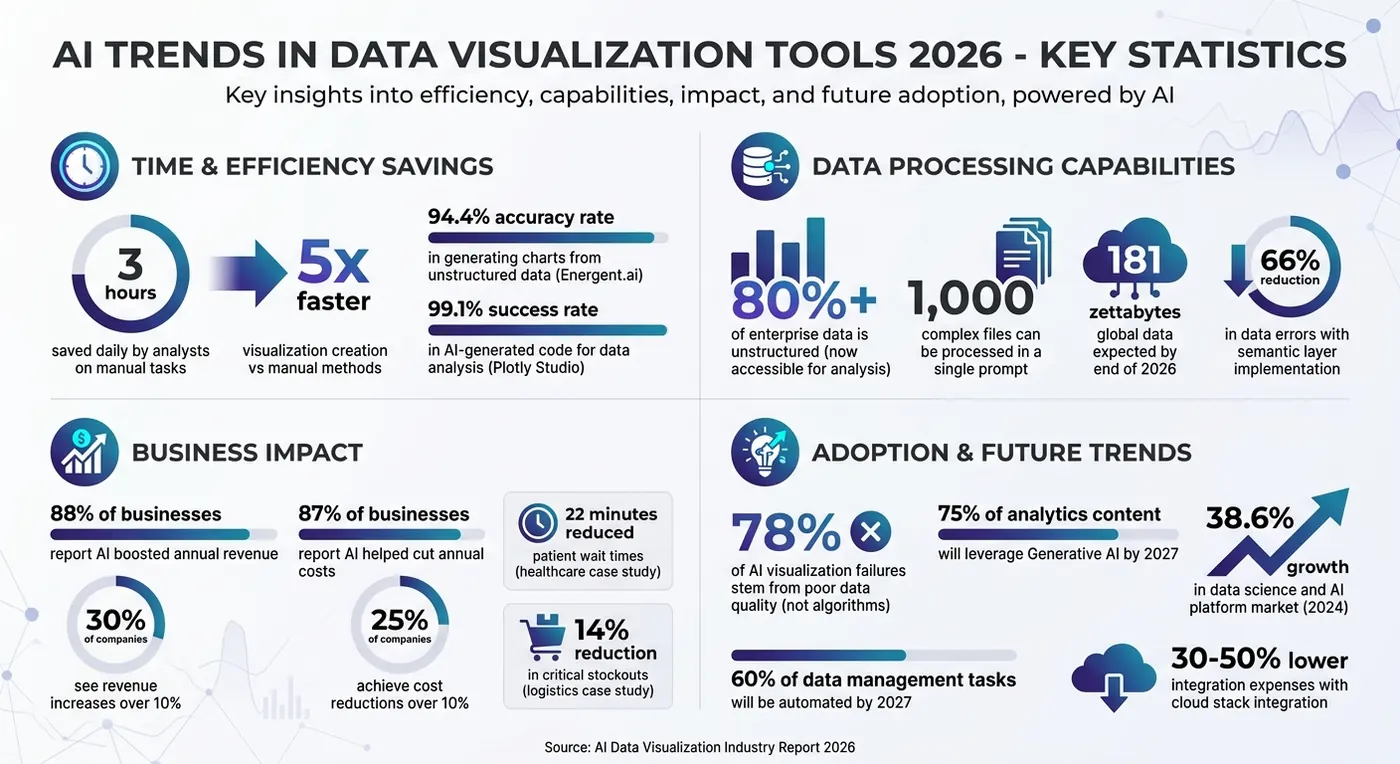
- Natural Language Requests: Users describe their needs in plain English, and AI handles chart creation, saving analysts up to 3 hours daily.
- Real-Time Dashboards: Dashboards update in milliseconds, integrating live data for instant decision-making. Predictive analytics now helps businesses act before problems arise.
- Unstructured Data Processing: AI processes PDFs, scans, and images, converting them into structured visuals. Over 80% of enterprise data is now accessible for analysis.
- Generative AI: AI automates chart formatting, scaling, and even AR/VR visualizations, making data exploration more interactive and accessible.
- Conversational Analytics: Non-technical users can refine visualizations through simple commands, democratizing data access across organizations.
With global data expected to reach 181 zettabytes by the end of 2026, these advancements are reshaping how businesses analyze and act on information. But success depends on strong data quality and governance to ensure reliable insights.
AI-Assisted Data Visualization and Dashboards
AI-Powered Chart and Visual Creation
Building charts and visuals has become much easier thanks to AI. Instead of manually selecting chart types and dragging data fields into place, you now just describe what you need, and AI takes care of the rest. This approach not only saves time but also simplifies the process of turning raw data into actionable insights.
Automated Chart Recommendations
Imagine asking an AI tool to "show me total monthly revenue in USD by product category." The system doesn’t just retrieve the data - it makes a series of analytic decisions for you. Using Large Language Models (LLMs), the AI understands your request by identifying key elements like metrics, timeframes, and visualization preferences. For instance, if you use the word "trend", the AI knows to create a line chart, while "compare" suggests a bar chart.
The AI translates your natural language input into technical queries, ensuring the data is correctly processed. It handles tasks like verifying data types, grouping, aggregating, and even joining datasets as needed. For example, if you mention "revenue", the system might map it to a technical label like "gross_sales_usd" by analyzing semantic similarities.
"Generative AI understands semantic meaning, not just data structure." - Ashesh Dhakal, Founder & Data Scientist, AnalyzeData
By 2026, top platforms are expected to achieve over 94% accuracy in generating charts from unstructured data. Energent.ai, for example, has already hit a 94.4% accuracy rate on the HuggingFace DABstep financial analysis benchmark, outperforming major players like Google (88%) and OpenAI (76%). This level of precision translates to significant time savings, with analysts reporting an average of 3 hours saved daily on manual tasks.
Pattern Detection and Data Insights
AI doesn’t stop at creating visuals - it also uncovers patterns and anomalies in your data. Using machine learning, advanced systems can automatically detect correlations, clusters, and outliers without requiring explicit instructions. These findings are often presented as narrative summaries alongside the visuals, highlighting key insights that might otherwise go unnoticed.
Modern tools rely on "agentic workflows", where multiple AI agents work together across the entire data pipeline, ensuring context is preserved throughout complex operations. To improve reliability, leading platforms now generate Python or SQL code for their analyses. This allows users to review the logic and verify the calculations, ensuring accuracy and transparency. For instance, Plotly Studio boasts a 99.1% success rate in AI-generated code for data analysis.
AI has also advanced in handling unstructured data, which makes up over 80% of enterprise information. Tools can now process up to 1,000 complex files - like PDFs, scans, and images - in a single prompt, transforming them into structured visuals. Some platforms even offer an "Explore Mode", where the system autonomously scans datasets and suggests multiple visualizations based on the patterns it identifies. This feature is particularly useful for tackling large-scale, enterprise-level data challenges.
Real-Time Dashboards and Analytics
Static dashboards that only update daily are a thing of the past. By 2026, AI-powered systems are delivering continuous data updates by pulling information from multiple sources at once. This evolution is reshaping how businesses monitor their operations and respond to changes on the fly. These systems are not just about keeping up - they pave the way for predictive tools that turn dashboards into proactive decision-making hubs.
Live Data Integration
Today’s dashboards rely on advanced architectures, like parallel sub-agents and local system calls, to pull data from multiple APIs simultaneously. This ensures the data you see isn’t just "recent" but genuinely up-to-the-second. For edge monitoring, AI agents can even execute local shell commands to track critical metrics, providing immediate and dependable updates.
The industry is moving beyond descriptive analytics - where data simply reflects past events - to operational analytics, which allows businesses to act in the moment. AI agents now identify risks in real time through streaming data and can trigger automated actions, such as sending alerts or initiating API calls, without waiting for human input. For example, in early 2026, a mid-sized healthcare provider used Microsoft Power BI's Copilot to merge patient intake data with staffing ratios across three hospitals. This AI-powered live dashboard helped reduce patient wait times by 22 minutes during peak hours.
To avoid overwhelming teams with unnecessary alerts, it’s smart to set thresholds based on sustained conditions rather than reacting to every small spike. For instance, instead of flagging a brief CPU usage increase, you could configure alerts to trigger only if usage exceeds 90% for five consecutive minutes. This ensures your team focuses on real problems, not noise.
Predictive Analytics in Dashboards
Modern dashboards don’t just show you what’s happening now - they help predict what’s coming next. With predictive-first user interfaces, forecasting and scenario analysis are built right into standard views. These dashboards essentially act as "decision fabrics", helping teams take immediate, informed action. They operate on a predict–observe–act cycle: models forecast outcomes, tools monitor for deviations, and automation steps in to handle responses.
"Real-time dashboards in 2026 are judged by how well they close the loop between insight and action, not just by refresh rate." – Ava Lin, Head of Product - Scheduling Systems
To build confidence in these tools, dashboards now display confidence intervals by default, highlighting uncertainties rather than presenting predictions as absolute truths. A great example of this is a multinational logistics firm that used Tableau Pulse in 2026 to unify global supply chain metrics. By leveraging natural language summaries to flag inventory deviations, they reduced critical stockouts by 14% in just six months. Looking ahead, by 2027, it’s predicted that 60% of data management tasks will be automated, speeding up the delivery of actionable insights.
When designing predictive dashboards, it’s crucial to focus on the specific questions users need answered instead of overwhelming them with raw data. Transparency also matters - showing inference budgets in the dashboard can help teams understand the cost of running complex models. For high-stakes decisions, it’s wise to keep a human-in-the-loop process in place, along with clear audit trails, to maintain accountability and trust.
Natural Language Processing for Data Visualization
By 2026, AI has reshaped how we interact with data, making it possible to turn plain English into precise visual representations. Forget learning SQL or fiddling with complicated dashboard tools - now, you can just type something like, "show me total monthly revenue in USD by product category", and instantly get a visualization.
This game-changing capability relies on NL2SQL translation, where AI deciphers user intent and converts it into structured database queries behind the scenes. Advanced systems use semantic parsing to understand metrics, time frames, and the best chart types for the request. For instance, if you ask for a "trend", the system knows a line chart is the way to go. Adding a semantic layer like dbt or LookML can cut data errors by as much as 66%. On the other hand, models working directly with raw datasets - sometimes containing over 1,000 columns - can see accuracy plummet to just 10.1%.
Conversational Data Queries
Conversational data tools make the process even smoother by addressing ambiguities directly. Instead of guessing what you mean, these tools ask clarifying questions like, "Do you want total CAC or a breakdown by channel?" This back-and-forth creates a dynamic and user-friendly way to explore data.
By 2026, tools like Claude have taken this a step further, offering interactive JavaScript-based charts right in the chat interface. Users can click on chart segments to drill down or filter by date - all without leaving the conversation. This interactivity speeds up the "think-and-verify" process, cutting it down from minutes to seconds. Users can refine their queries by specifying metrics, time periods, or groupings and even request plain-language summaries to complement the visuals. These conversational loops make it easier for non-technical users to navigate complex datasets and uncover insights.
Simplifying Complex Data
For those without a technical background, NLP has become a powerful tool for simplifying intricate datasets. It can process everything from financial statements to multi-page reports using natural language commands, giving business users access to insights they previously couldn't reach. By grounding AI in governed business logic, these tools ensure that non-technical teams can confidently explore data while maintaining accuracy.
"The gap between conversational data query tools is less about NLP capability and more about governance." – Sylus.ai
Preventing AI hallucinations - where the system generates inaccurate or misleading results - hinges on strong governance. Tools that rely on semantic layers with trusted business logic and metric definitions are far more reliable than those querying raw datasets. When evaluating these tools, it’s smart to test them on your actual, messy warehouse data instead of polished vendor demos to spot potential translation issues. This governance-first approach is what separates tools that provide trustworthy insights from those that simply look convincing. Combined with advancements in generative AI, these NLP-driven tools are paving the way for more immersive and interactive visualizations.
Generative AI and Immersive Visualizations
Generative AI has stepped into a new role as a design collaborator, taking over intricate visual tasks. Forget manually adjusting axes, picking chart types, or fine-tuning formats. Now, you can simply describe your needs in plain English, and AI takes care of the rest. For instance, if you mention "trend", it understands you're after a line chart. Say "proportions", and it defaults to a pie chart or treemap. Even better, today's AI adapts visualizations to fit specific business scenarios.
Generative AI for Custom Visualizations
Today's AI tools handle the nitty-gritty details like scaling axes, placing legends, formatting currencies, and adding overlays. They can also work wonders with messy, unstructured data - think financial PDFs, scanned invoices, or images - transforming it into polished charts and Excel-ready models.
AI doesn't just stop at visualization. It can run entire workflows independently, acting as a data assistant. It plans processes, interacts with APIs, and even executes Python code to analyze and visualize data - all without human input. Analysts using these tools save about three hours of manual work every day. And the process is fully conversational. Want to tweak a chart? Just ask for changes like "break down the 'Other' category" or "add a trend line". These refinements make AI an even more powerful ally in uncovering actionable insights and integrating seamlessly into business operations.
AR/VR Data Visualization
Generative AI is also breaking free from 2D charts, venturing into immersive AR/VR data visualization. Augmented and virtual reality bring data to life in three dimensions, letting users zoom, rotate, and slice through complex datasets. Hybrid environments now blend traditional 2D charts with 3D spaces, making even intricate data structures easier to navigate.
A standout example: In January 2025, researchers at the University Hospital Bonn introduced "VR-prep", a workflow that leverages open-source tools like Fiji and 3D Slicer to optimize medical imaging for the Medical Imaging XR (MIXR) platform. By shrinking DICOM file sizes from 382.2 MB to just 145.3 MB, they cut 3D object download times to a swift 3.22 seconds on an iPad Pro. This makes AR a practical tool for clinician-patient discussions.
In industrial settings, real-time AR overlays are becoming the norm. Smart glasses and mobile AR devices now display live data directly onto physical objects, such as machinery or medical scans. Immersive analytics also enables teams spread across the globe to collaborate in shared virtual spaces, working together on the same datasets. With 5G networks enabling smoother, high-quality data visualization in these immersive environments, businesses are finding new ways to tackle complex analytics. These advancements are transforming data from abstract numbers into concrete, actionable insights.
Business Implementation for AI Visualization Tools
AI Workflow Automation for Scale
Switching from manual chart creation to AI-driven workflows is more than a time-saver - it's about creating systems that grow with your business. Today's AI visualization tools handle the entire process: identifying key business questions, cleaning and analyzing data, spotting patterns, choosing the right charts, and even generating plain-English explanations. This kind of automation allows your team to focus less on tedious tasks and more on acting on the insights that really matter.
For example, analysts can save up to three hours a day, and marketing teams experience similar time savings when it comes to pulling data and preparing slides. With AI speeding up visualization creation by as much as five times compared to manual methods, your business gains the agility to adapt quickly to market changes.
However, it's worth noting that 78% of AI visualization failures stem from poor data quality rather than issues with the algorithms themselves. This makes auditing your data infrastructure a top priority. It's also important to select tools that fit seamlessly into your existing systems - like Power BI for Microsoft users, Tableau for those in Salesforce environments, or ThoughtSpot for cloud-based data warehouses. By focusing on specific challenges, you can make the most of what automation offers.
This approach not only improves operational efficiency but also lays the groundwork for faster, smarter business decisions.
Connecting Visual Data to Business Growth
Automated workflows aren't just about streamlining processes - they're a stepping stone to strategic growth. AI-generated visualizations help businesses grow by identifying anomalies and delivering actionable insights directly to decision-makers. Instead of relying on dashboards that react to issues, companies can move toward proactive intelligence, allowing leaders to address potential problems before they escalate.
AI tools also democratize data access, enabling non-technical staff to create professional-grade visualizations without needing advanced skills like SQL or data science. Considering that over 80% of critical business intelligence is locked in unstructured formats like PDFs and images, new AI agents can transform these sources into structured, usable dashboards - all without manual effort. Reducing the time spent on configuring charts removes a significant barrier to making data-driven decisions, directly impacting profitability.
Even with these advancements, the human touch is still essential. Around 65% of teams rely on analysts to validate AI-generated outputs to ensure they fit the specific context. As Morgan, an Analytics Lead, advises:
"Start small, test relentlessly, and never assume AI knows better than you".
Conclusion
The move toward AI-driven data visualization isn't just a trend - it's becoming a critical factor for staying competitive. With over 80% of enterprise data existing in unstructured formats like PDFs and scans, traditional BI tools simply can't keep up. This highlights the importance of adopting AI-native platforms to extract valuable insights from this untapped data and turn it into actionable strategies.
Consider this: 88% of businesses report that AI has boosted their annual revenue, with 30% seeing increases of over 10%. Meanwhile, 87% say AI has helped cut annual costs, with 25% achieving reductions of more than 10%. These numbers emphasize how AI can transform both profitability and efficiency when paired with a strong data strategy.
But success hinges on data quality. Nearly half (48%) of organizations cite poor data quality as their biggest hurdle. To maximize AI's potential, businesses need a solid data infrastructure. Integrating AI visualization tools with an existing cloud stack can lower integration expenses by as much as 30% to 50%.
The pace of change is staggering. In 2024, the data science and AI platform market grew by 38.6%. Looking ahead, 75% of analytics content is expected to leverage Generative AI by 2027. Businesses that delay AI adoption risk falling behind competitors who are already processing data at lightning speed, empowering non-technical teams, and uncovering insights that others might miss. The time to act is now.
FAQs
What data foundation is needed before using AI charting?
Before diving into AI charting tools, make sure your raw data is ready for processing. This might involve using structured formats such as Excel spreadsheets or CSV files, or even working with unstructured metrics. Well-organized and correctly formatted data plays a key role in ensuring accurate visualizations and reliable analysis.
How can we prevent wrong answers from NL data queries?
To make natural language data queries more accurate, you can apply strategies such as query correction, prompting users to provide missing details, and cross-checking outputs with verified facts. These steps help refine the process and reduce mistakes.
However, even with these measures, issues like hallucinations - where the model generates incorrect or fabricated information - can still happen, especially if fine-tuning hasn't been applied. While combining these approaches can enhance overall accuracy, challenges may still arise in particularly complex cases.
Where should a business start to deploy AI dashboards fast?
To roll out AI dashboards efficiently, begin with AI-powered data visualization tools that feature natural language interfaces and automation. These tools let users pose questions in plain language, making decision-making much faster. Platforms equipped with generative AI and autonomous analytics agents take it a step further by simplifying data preparation and visualization. They can transform raw data into actionable insights in no time, reducing the need for manual setup or advanced technical skills. This approach ensures quick deployment and faster access to results.