
If I had to boil this down to one line: pick ChatGPT for general work, Claude for long writing and hard thinking, Gemini for Google Workspace, and Perplexity for source-backed research.
That’s the short answer. In this comparison, I’d look at the six things that matter most for day-to-day work: drafting, analysis, web research, document handling, workflow fit, and price. Most paid plans sit near $20/month, so the bigger question is not cost. It’s which tool fits the job.
Here’s the fast breakdown:
- ChatGPT: best for broad use across writing, image work, idea generation, and data tasks
- Claude: best for long documents, careful thinking, and polished writing
- Gemini: best if I already live in Docs, Gmail, Sheets, and Drive
- Perplexity: best when I need live web results with citations
- Free plans work for light use, but limits show up fast
- Paid plans make more sense for teams, long files, and business use
The main takeaway: no single tool wins every category. The best setup is often more than one tool, used in a clear order.
ChatGPT vs Claude vs Gemini: Which AI Is Worth $20/Month in 2026?
Quick Comparison
| Tool | Best For | Main Strength | Main Limitation | Paid Plan |
|---|---|---|---|---|
| ChatGPT | General business work | Broad feature mix, image generation, drafting | Long outputs can feel patterned | $20/month |
| Claude | Long writing and analysis | Strong reasoning, handles dense docs well | No built-in image generation; message caps | $20/month |
| Gemini | Google-centered teams | Tight Workspace fit, large file handling | Less steady outside Google-heavy use | $19.99/month |
| Perplexity | Research and fact-checking | Citations on answers, live web focus | Weaker for deep drafting and project memory | About $20/month |
A simple way I’d use them is this: Perplexity for research, ChatGPT for first-pass structure, Claude for final writing, and Gemini for sharing work inside Google tools.
Tool-by-Tool Breakdown: Strengths, Weaknesses, and Best Business Uses
ChatGPT and Claude: Best for Drafting, Reasoning, and Document Work
Use ChatGPT when you need broad drafting and fast iteration. It’s the most flexible general-use tool in this group. You can use it for marketing copy, idea generation, SOPs, image generation, and general drafting without much friction. The tradeoff is consistency. In longer drafts, the writing can start to feel a bit formula-driven. And for long documents, the consumer plan’s 128K token context window means small details can slip through the cracks.
Use Claude when the work is longer, denser, or needs more careful reasoning. Claude is better at holding onto the thread across long contracts, strategy briefs, and other dense documents. Its writing tends to sound more human, and it usually follows nuanced instructions with less drift. The downsides are pretty clear too: no native image generation, stricter message caps during peak hours, and a habit of adding disclaimers you may not want.
| Feature | ChatGPT (GPT-5.4 Pro) | Claude (Opus 4.7) |
|---|---|---|
| Writing Quality | Broad and capable; can feel generic | Natural prose; follows style instructions closely |
| Reasoning Depth | Strong for general tasks | Stronger for complex, multi-step analysis |
| Document Analysis | 128K tokens on consumer plans; up to 1M on Pro | Up to 1M tokens |
| Workflow Flexibility | Broadest feature set; strong custom GPT support | Strong, but fewer third-party integrations |
| Best For | SOPs, marketing copy, ideation, image generation | Strategy docs, contracts, coding, long-form writing |
If the task depends on live web facts or files inside Google Workspace, Gemini or Perplexity makes more sense.
Gemini and Perplexity: Best for Google-Centered Work and Web Research
Use Gemini if your team already works inside Google Workspace all day. That’s where it has the clearest edge. If your drafts, notes, and files already sit in Docs, Sheets, Gmail, or Drive, Gemini fits right into that flow. It also handles large files well. The weak spot is output consistency, and its fit gets narrower if your team isn’t already deep in Google’s stack.
Use Perplexity when you need live research with sources attached. It’s the cleanest option here for competitor research and fact-checking. If you need to verify claims, scan a market, or pull source-backed notes fast, Perplexity does that well. What it does not do as well is drafting or heavier project work. It also doesn’t keep memory across sessions, so it won’t help much if you want the tool to build on past work over time.
| Feature | Gemini (3.1 Pro) | Perplexity (Sonar Pro) |
|---|---|---|
| Integrations | Native Google Workspace support | Web-first research workflow |
| Research Freshness | Can lag hours to a full day on breaking news | Minutes-to-hours freshness lag |
| Citation Quality | Moderate | High; inline citations on every claim |
| Productivity Fit | High for Google-centric teams | High for research-heavy roles |
| Best For | Multimodal processing, large file analysis, Workspace automation | Competitor research, fact-checking, market analysis |
Once you know which tool fits the task, the next thing to look at is plan limits.
Free vs. Paid Plans: What to Expect Before You Commit
The big gap isn’t just price. It’s what each plan opens up. Free plans can handle light use, but the limits show up fast once work picks up. Gemini’s free tier gives the most room for casual use. Perplexity’s free tier gives you 5 Pro searches per day, which disappears fast if you’re doing active research. ChatGPT and Claude both give limited access to their top models on free plans, but rate limits become obvious pretty quickly if you use them heavily.
| Plan | ChatGPT | Claude | Gemini | Perplexity |
|---|---|---|---|---|
| Free | Limited GPT-5.3 access | Limited Sonnet 4.6 | Gemini 2.5 Flash (generous) | 5 Pro searches/day |
| Pro ($20/mo) | GPT-5.4, DALL-E, Sora | Opus 4.7, Projects | Gemini Advanced | Deep Research, Sources |
| Team/Business | $25/user/mo | $25/user/mo | ~$28/user/mo | $40/user/mo |
For solo founders doing lighter work, free plans can go farther than you might think, especially with Gemini. But if your workflow revolves around long documents, team use, or sensitive business data, paid plans start to make a lot more sense. For sensitive business data, enterprise tiers are the safer pick.
From here, the next step is matching each tool to the startup task.
Side-by-Side Decision Guide for Common Startup Tasks
Which Tool to Use for Content, Research, Strategy, and SOPs
Pick the tool based on the job, not the hype. That simple rule saves time and cuts a lot of trial and error. The table below maps that idea to common startup tasks.
| Business Task | Best Tool | Why |
|---|---|---|
| Blog Drafting | ChatGPT | Best all-around option for tone control and fast rewrites. |
| Strategy Memos | Claude | Better at reasoning through complex, multi-step work. |
| Competitor Research | Perplexity | Gives answers with citations. |
| Investor and board decks | Claude | Handles long-context review and more involved analysis. |
| Process Docs (SOPs) | ChatGPT | Fast at turning rough notes into clean, structured docs. |
| Long-document review | Gemini | The 2 million-token context window can handle multi-document analysis. |
If the output needs to be backed by sources, start with Perplexity.
Best Picks by Role: Founder, Operator, and Consultant
The best tool also shifts by role. Why? Because each role hits a different bottleneck.
| Role | Primary Tool | Secondary Tool | Key Outcome |
|---|---|---|---|
| Founder | Claude | Perplexity | Strategic positioning and verified market data |
| Operator | Gemini | Claude | Ecosystem efficiency and structured SOPs |
| Consultant | Claude | Perplexity | High-quality deliverables and sourced research |
For founders, Claude is a strong fit for open-ended strategy work like positioning, fundraising stories, and competitive framing. Perplexity supports that work with sourced market data you can cite.
For operators, Gemini makes more sense when the team already works inside Google Workspace. Claude becomes the better handoff when a process doc needs clearer structure and tighter logic.
For consultants, Perplexity Pro can be the right first step for client research, especially when you need access to paywalled databases like Statista and PitchBook. Then Claude can take over for the final draft, keeping the writing polished and professional.
Role-based defaults tend to work better than trying to squeeze one tool into every part of the workflow.
How to Combine These Tools Into Working Workflows
Multi-Tool Workflow Patterns for Startup Execution
Once you know what each tool is best at, the next step is to connect them into one working flow. Role tells you the default tool. Workflow tells you the order. And in practice, order matters more than most teams expect.
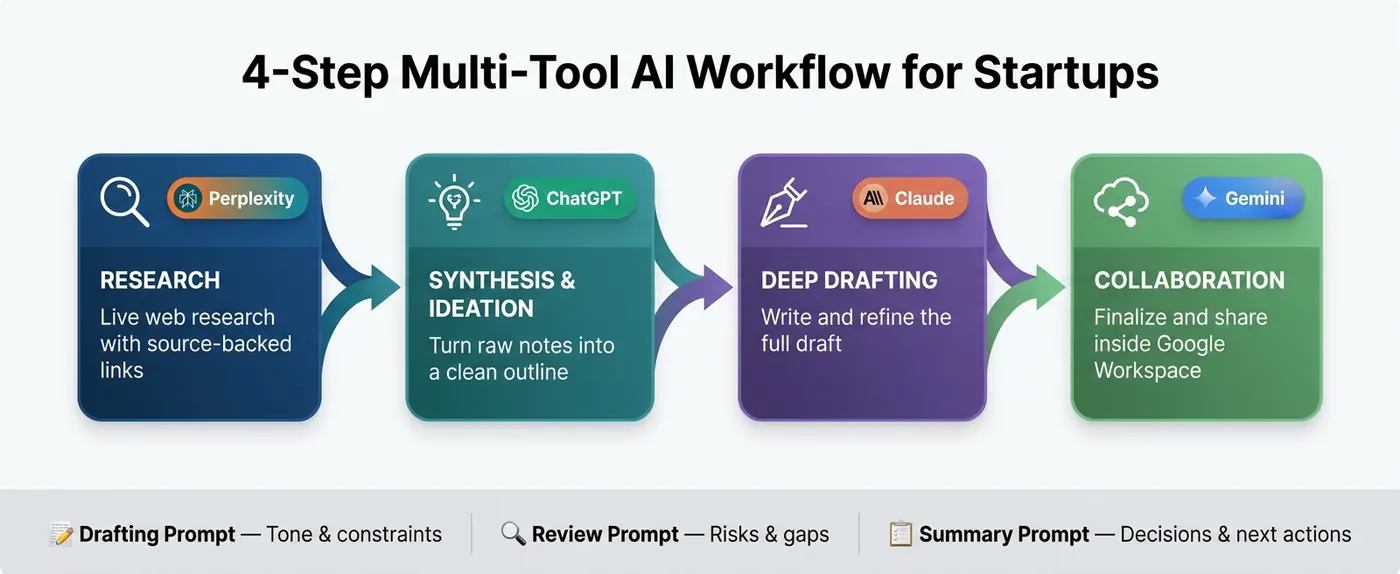
A simple four-step sequence works well for many startup tasks:
- Research (Perplexity): Start with live web research and source links.
- Synthesis & Ideation (ChatGPT): Turn raw notes into a clean outline.
- Deep Drafting & Refinement (Claude): Write and refine the full draft.
- Collaboration & Ecosystem Integration (Gemini): Finalize the work and share it in Workspace.
This kind of setup cuts a lot of friction. Instead of asking one tool to do everything, you let each one handle the part it does best. Think of it like a relay race, not a solo sprint.
One tip that pays off fast: standardize three prompts across the team. Use a Drafting prompt for tone and constraints, a Review prompt for risks and gaps, and a Summary prompt for decisions and next actions. That keeps output more consistent and saves people from reinventing prompts every time.
If your team leans on Claude, its Projects or Skills features can help you load SOPs and brand guidelines up front. That makes it easier to keep output on-brand from the first pass.
There’s also a common trap here: fragmented workflows. When teams use too many tools without a shared system, knowledge gets scattered fast. A cleaner setup is to stick with one research AI, one drafting AI, and one ecosystem AI. That helps reduce fragmentation and makes handoffs far less messy. For high-impact output, especially legal, financial, or customer-facing commitments, a final human verification step should always stay in the process.
How Patrick Frank's Consulting Turns AI Tools Into Repeatable Systems
That workflow only works if the team follows the same process each time. The goal isn't to pile on more tools. The goal is to build a system people can repeat without guesswork.
Most teams start in a loose, ad hoc way. One person tries a tool, gets a decent result, and the team starts using it bit by bit. On the surface, that feels fine. But ad hoc prompting doesn't scale. Output varies, quality drifts, and the team starts depending on the one person who knows the "good prompts."
The jump from using AI to running AI as a system is where Patrick Frank's consulting work comes in. His work covers strategy, workflow design, automation, and team training. Each piece targets a different part of the implementation problem.
AI speeds up clear processes. It multiplies unclear ones.
Conclusion: Pick the Tool That Fits the Job
The rule is simple: match the tool to the task, not the hype. Teams tend to drop AI tools when they pick based on buzz instead of how the work actually gets done.
With that in mind, the shortlist is pretty clear:
- Claude: Best for drafting and complex reasoning.
- Perplexity: Best for sourced web research.
- Gemini: Best inside Google Workspace.
- ChatGPT: Best for broad, flexible work across drafting, analysis, and multimodal tasks.
No single tool wins every category. In practice, a simple system usually works better than relying on one tool for everything.
Once the tool is chosen, the bigger payoff comes from how the team uses it day to day. Tool choice is only one part of the job. Patrick Frank's consulting focuses on turning ad hoc AI use into repeatable workflows. If you want a repeatable AI workflow, a 1-on-1 Strategy Session can help build it.
FAQs
Which AI tool should I start with if I only want to pay for one?
Choose based on the task you do most often. ChatGPT is the best place to start for most people because it handles a bit of everything, feels familiar, and works well in many day-to-day situations.
If your work leans more toward deep focus, coding, or polished writing, Claude may be a better match. If you spend a lot of time in Google Workspace, Gemini is the smoothest option. And if you need research you can check with sources and citations, Perplexity is the strongest pick.
When does it make sense to use more than one AI tool in one workflow?
It makes sense when your workflow needs specialized capabilities that one platform doesn’t handle well. Trying to force every task into one tool can slow you down and lead to clunky workarounds.
Use multiple tools when you move between jobs like long-form writing or coding, real-time research with citations, creative drafting, or Google Workspace and multimodal analysis. The idea is simple: give each tool a clear role.
How should I choose between a free plan and a paid plan for business use?
For most business users, a free plan is enough for casual tasks, basic research, or simply getting started with AI.
Once you use AI for more than 30 minutes a day, a paid plan often makes more sense. Most plans cost about $20/month, and you usually get higher usage limits, faster replies, and access to top-tier models.
Pick the paid plan based on how you work most often:
- ChatGPT Plus for general productivity
- Claude Pro for writing and coding
- Gemini Advanced for Google Workspace
- Perplexity Pro for research