
If I had to give one short answer: Lovable is the best starting point for most non-technical beginners, Bolt is best for frontend-first mockups, and Replit is best if you want to learn code while building.
If you’re picking your first AI app builder, I’d focus on 6 things:
- How fast you can get something live
- How much code you need to touch
- How polished the output looks
- How easy it is to edit later
- What the free and $20–$25/month plans give you
- Whether it fits a landing page, dashboard, or MVP
Here’s the short version:
- Lovable fits beginners who want a web app with login, database, and payments without much setup.
- Bolt fits people who want fast frontend output and don’t mind looking at code.
- Replit fits beginners who want a full coding workspace with AI help, terminal access, and debugging practice.
One pricing detail matters early: Lovable starts at $25/month, Bolt starts at $25/month, and Replit starts at $20/month. Free plans exist, but limits can show up fast once you start editing more than a basic test build.
AI Tool Battle: Lovable vs Replit vs Bolt - Who Builds the Best Web App?
Quick Comparison
| Criteria | Lovable | Bolt | Replit |
|---|---|---|---|
| Best for | Non-technical founders | Frontend-first builders | Beginners learning dev skills |
| Start-up time | Fast | Fast | Slower |
| Code exposure | Very low | Medium | High |
| Best first project | MVP, dashboard, SaaS test | Landing page, UI prototype | Coding project with AI help |
| Backend support | Strong for beginner needs | More limited for beginner use | Strong, but more setup |
| Entry price | $25/month | $25/month | $20/month |
| Main risk | Credit limits | Token use can climb | More time spent debugging |
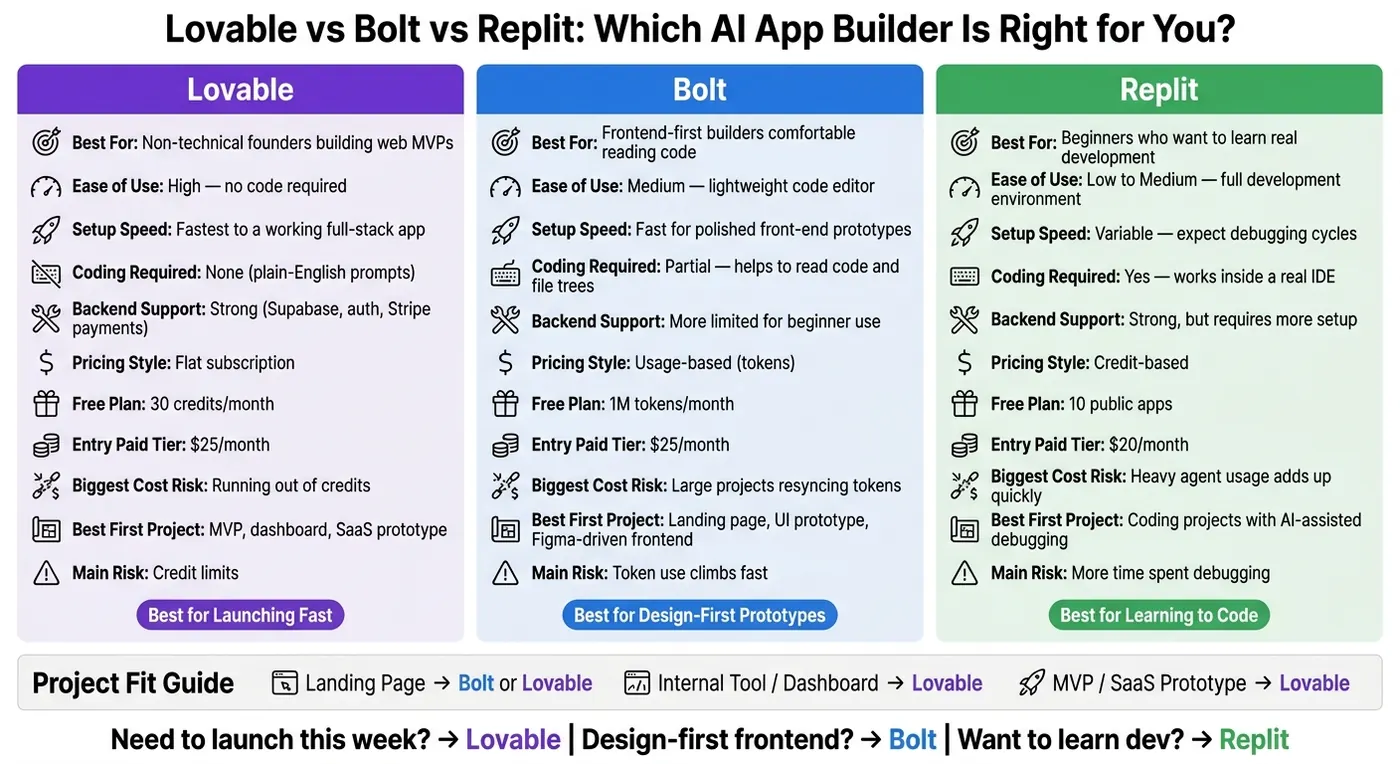
My read is simple: pick Lovable if you want to launch this week, Bolt if design comes first, and Replit if learning code is part of the goal.
That’s the full decision in plain English. The rest of the piece just shows where each tool fits best.
Lovable vs Bolt vs Replit: side-by-side overview
Here’s the quick version before we get into the details. Look at these three through a simple lens: how fast you can build, how easy it is to make changes, and how much code you’re willing to deal with.
| Feature | Lovable | Bolt | Replit |
|---|---|---|---|
| Ease of Use | High - no code required | Medium - lightweight code editor | Low to Medium - full development environment |
| Setup Speed | Fastest to a working full-stack app | Fast for polished front-end prototypes | Variable - expect debugging cycles |
| Coding Required | None (plain-English prompts) | Partial - works best if you can read code and a file tree | Yes - you'll work inside a real IDE |
| Pricing Style | Flat subscription | Usage-based | Credit-based |
| Best fit | Non-technical founders building SaaS, dashboards, or web MVPs | Solo builders comfortable with code, building landing pages or prototypes | Aspiring developers who want to grow through real debugging cycles |
Bottom line: Lovable is the simplest, Bolt is the fastest for code-visible prototyping, and Replit is the best pick for beginners who want to grow into real development.
Use the table as a snapshot. The next three sections show how each tool handles beginner projects in practice.
Lovable: Best for non-technical founders building polished web MVPs
Lovable is the fastest way for a non-technical founder to get to a polished full-stack MVP. It can generate full-stack React apps with Supabase for the database, built-in authentication, and Stripe for payments, all without touching a terminal. It also comes with 80+ verified native integrations that need no manual coding to set up.
That’s a big deal if you’re building a SaaS-style product. If you need user logins, a real database, and a clean app shell, Lovable gets you there with less friction than the other options in this comparison.
Bolt: Best for fast prototypes and code-visible workflows
Bolt works a bit differently. You give it a prompt, it generates code, and you can see the full file structure right away. That visibility is helpful. You’re not guessing what the tool made. But there’s a catch: you need to feel at least somewhat at ease reading code and moving through folders.
It also supports more frameworks than Lovable, including React, Next.js, Vue, Svelte, and Astro. That gives you more room to pick the setup you want. The tradeoff shows up on the backend, where cost and complexity can climb fast. So Bolt shines most when you want to move fast on front-end concepts, landing pages, or rough product prototypes.
Replit: Best for beginners who want room to grow into real development
Replit is the most like working in an actual dev setup. It supports over 50 programming languages and gives you access to a terminal, Git version control, and a real file system. That means you’re not just prompting a tool and hoping for the best - you’re working inside a real IDE.
Its AI agent can help plan a stack and walk you through debugging. For beginners, that matters. You get help, but you also get exposure to how software is built and fixed. If you want a codebase you can keep learning from and keep extending over time, Replit makes the most sense.
How each builder handles common beginner projects
The easiest way to pick a builder is to look at the first things most beginners actually make. And those early projects usually fall into three buckets: a landing page, an internal tool, or a small MVP.
Each one changes the priority a bit. Sometimes speed matters most. Sometimes you need built-in auth and database support. Sometimes you just want the thing live without wrestling with code.
Here’s the simple fit:
| Project Type | Best-Fit Builder | Why It Fits | Main Tradeoff |
|---|---|---|---|
| Landing page / lead-capture | Bolt or Lovable | Bolt is best for Figma-driven frontends; Lovable is best for quick polished pages. | Can hit token limits on complex designs; less flexible for code-level fine-tuning. |
| Internal tool / dashboard | Lovable | Its Supabase integration makes it easy to scaffold database, auth, and CRUD workflows from plain-English prompts. | More debugging, more control. |
| MVP / SaaS prototype | Lovable | It handles auth, database, and payments in one conversational flow, which is ideal for a first validation build. | Less room for highly custom backend logic later. |
The sections below show where each tool saves time and where it slows you down.
Building a landing page or lead-capture site
For a simple marketing page, speed beats flexibility.
Bolt and Lovable both work well here, but they shine in different ways. Bolt stands out when you already have a Figma mockup and want the frontend to match it fast. That makes it a strong pick for design-first work.
Lovable is the easier option if you're starting with a blank page. You can prompt it in plain English and get a polished, SaaS-style page in minutes, without writing code.
Replit tends to add extra friction for this kind of project. If all you need is a clean landing page, it can feel like bringing a toolbox when a screwdriver would do.
Building an internal tool or dashboard
Things change once a database shows up.
At that point, Lovable becomes the clearest beginner pick. Its native Supabase integration makes it easy to scaffold database tables, authentication, and admin-style interfaces from plain-English prompts. That cuts out a lot of setup work that usually trips people up early on.
Replit makes more sense when you need backend logic that goes past basic data handling and access control. The catch is simple: that extra control usually means more debugging. For most first-time builders, that's not a fun trade.
Building an MVP or simple SaaS prototype
For early validation builds, fewer moving parts usually win.
Lovable is the strongest default for beginners because it can handle authentication, database, and payments in one conversational flow. That makes it a good match when you want to test an idea fast instead of piecing together half a dozen tools. In one 2026 test, Lovable produced a working app in under 10 minutes.
Bolt can still help if your main goal is to move fast on the frontend. But backend auth may take multiple iterations, and costs can climb fast.
Replit can also do the job, but beginners should expect more debugging. And if you're just trying to validate an idea, that time cost adds up fast.
Pricing, tradeoffs, and beginner fit
What you get for free and what changes at the entry paid tier
All three tools come with free tiers. But if you're a beginner, you can hit the ceiling fast once you need private projects, custom domains, or a few rounds of edits.
| Lovable | Bolt | Replit | |
|---|---|---|---|
| Free plan limit | 30 credits/mo | 1M tokens/mo | 10 public apps |
| Entry paid tier | $25/mo | $25/mo | $20/mo |
| Billing basis | Credits | Tokens | Credits |
| Biggest cost risk | Running out of credits | Large projects resyncing tokens | Heavy agent usage adds up quickly |
The sticker price matters, sure. But what matters more is the friction you feel once you start editing, debugging, and sharing your app.
For landing pages and quick prototypes, the free plans usually go a decent distance. For internal tools and MVPs, where you need auth, a database, and several rounds of changes, paid plans show up sooner than most beginners think.
Lovable is the simplest route if you want a full-stack MVP with auth, database, and payments handled for you. Bolt is fast for frontend prototypes, but token use climbs as the codebase gets bigger because each prompt resyncs the full project. Replit gives you the most room to grow into actual development, with a full IDE, terminal access, and support for 50+ programming languages, but it takes more time to learn.
A simple way to think about it:
- For a first validation build, favor speed.
- For a longer build, pay closer attention to debugging and maintenance.
How Patrick Frank helps founders choose the right build path
Once you know which builder fits, the next step is turning that choice into a build plan you can actually follow.
Patrick Frank helps founders turn the right builder choice into a clear product and implementation plan.
Conclusion: Which AI app builder should beginners use?
If you judge by ease of use, setup speed, coding needed, and how well each tool fits a launch, the answer is pretty clear.
Lovable is the fastest way for a non-technical founder to get a working full-stack MVP live. If you want a no-code full-stack MVP, go with Lovable.
Bolt makes the most sense for solo founders who want clean output they can export and keep using. If your goal is a fast, design-first frontend prototype, pick Bolt.
Replit is the best fit if you want to understand how the code works while you build. If you want a real dev environment that helps beginners learn by doing, choose Replit.
Need to launch this week? Pick Lovable. Building a design-heavy frontend? Pick Bolt. Want to learn real development as you go? Pick Replit.
FAQs
Which builder is easiest to switch away from later?
Replit is the easiest one to move away from if you want more control and room to work your own way. From day one, you have full ownership of your codebase.
Lovable and Bolt also let you export to GitHub, so you’re not stuck there either. The difference is more about workflow. Replit leans closer to a standard development setup, while the other two put more distance between you and the code to make building and deployment simpler.
How much debugging should a beginner expect with each tool?
It comes down to how comfortable you are with technical work.
Lovable usually asks for the least debugging. Its error messages tend to be simpler, and fixes are often easier to spot.
Bolt usually needs more hands-on troubleshooting, especially when backend logic is involved.
Replit is the most technical of the three and often calls for more structured, manual debugging to get the app stable.
What should I choose if I need speed and customization?
If you need both speed and customization, Bolt is the best fit. It sits in the middle: faster to iterate with AI than coding from scratch, while still letting you edit the code yourself.
That means you get more control over your app’s logic and design than you would with a stricter no-code builder, without slowing down the setup process.