
If I had to give the short answer: I’d pick Claude Code for larger build tasks and Cursor for day-to-day editing. That’s the core split.
Here’s what matters most for founders with limited engineering time:
- Claude Code fits multi-file work, backend setup, refactors, and bug hunts across a codebase
- Cursor fits in-editor work like UI changes, small fixes, and flow updates
- Claude Code often needs more review because it does more at once
- Cursor is easier to budget for with a subscription model
- Claude Code can cost more month to month if usage climbs
One data point in the article stands out: one founder said Claude helped go from idea to revenue in 168 hours. Another said a 60+ person team more than doubled output after changing how they worked around Claude Code.
So if you want to delegate, I’d lean Claude Code. If you want to stay in flow inside the editor, I’d lean Cursor.
Cursor vs Claude Code: Which One Actually Works?
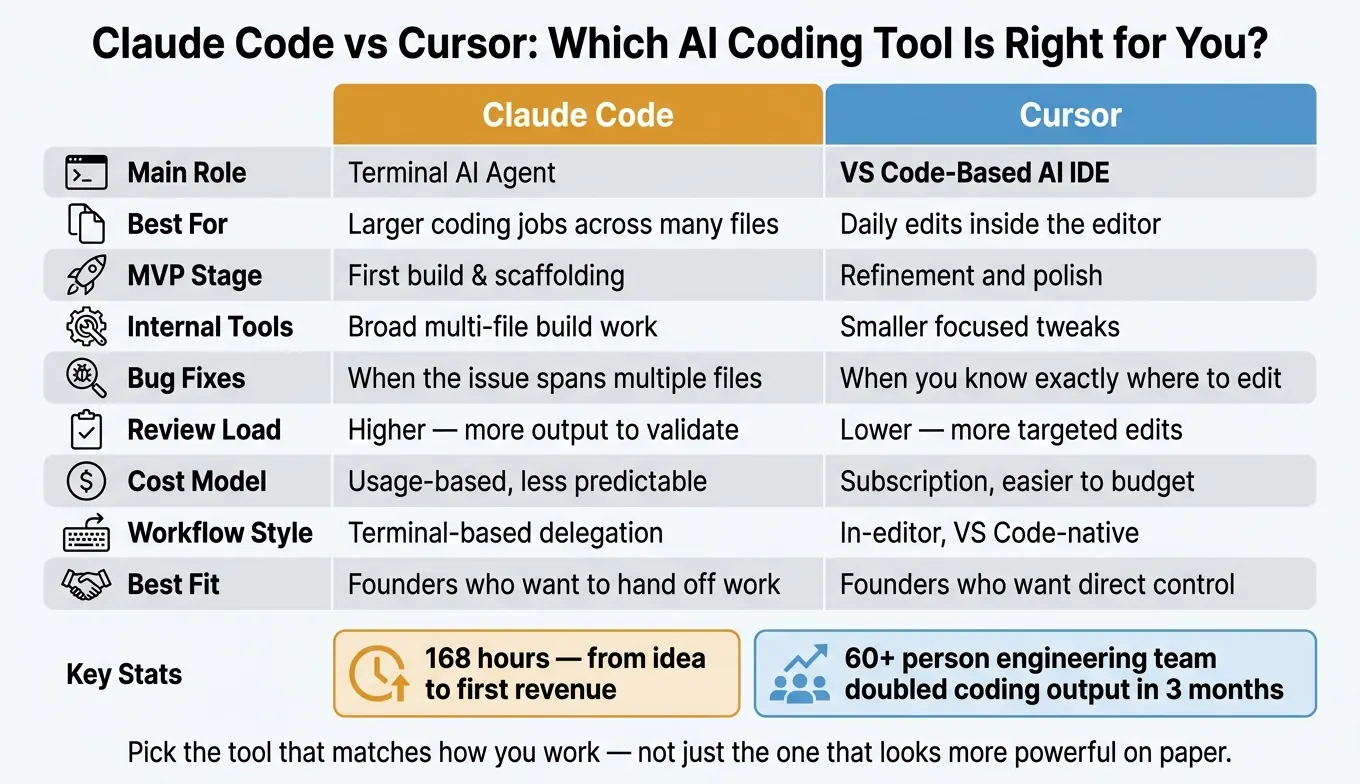
Quick Comparison
| Criteria | Claude Code | Cursor |
|---|---|---|
| Main role | Terminal AI agent | VS Code-based AI IDE |
| Best for | Larger coding jobs across many files | Daily edits inside the editor |
| MVP stage | First build | Refinement and polish |
| Internal tools | Better for broad build work | Better for smaller tweaks |
| Bug fixes | Better when the issue spans files | Better when you know where to edit |
| Review load | Higher | Lower |
| Cost model | Usage-based, less predictable | Subscription, easier to plan |
| Best fit for founders | Founders who want to hand off work | Founders who want direct control |
My takeaway: pick the tool that matches how you work now, not just the one that looks more powerful on paper.
Claude Code: Best for Delegating Larger Coding Jobs
Claude Code shines on delegated work that spans multiple files. It fits best when you can hand off a clear task, let it run, and then review what it produced.
Where Claude Code Helps Founders Move Faster
The biggest time savings show up in jobs that touch a lot of files at once: scaffolding an MVP, refactoring a module, wiring up a backend integration, or building a CLI. That’s where Claude Code’s autonomy has the most impact. But there’s a catch: that speed also changes how you work and adds more review overhead.
One founder used Claude to move from concept to revenue in 168 hours.
Pricing, Workflow Trade-Offs, and Learning Curve
Heavy use can drive monthly spend up fast, so it’s smart to watch usage closely. At scale, usage-based costs can pile up sooner than many founders expect, which makes tracking from day one a good move.
Claude Code tends to reward founders who are open to changing how they work. It’s not a drop-in tool. Teams that get the biggest gains have rebuilt parts of their process around knowledge discovery and validation loops. If you use it like a chat assistant, you probably won’t see the same kind of payoff.
Cursor goes the other way. It keeps the founder inside the editor, which gives tighter day-to-day control.
Cursor: Best for Staying Inside the Editor
If Claude Code works better for delegation, Cursor works better for hands-on editing. It fits founders who want AI help without leaving the editor. Because it's a VS Code fork, it feels familiar to people who already use VS Code. That matters most when you need fast iteration on visible product work, like MVP tweaks, bug fixes, and internal tool updates.
Where Cursor Helps Founders Build Faster
Cursor's biggest edge is the tight feedback loop. You make a change, see the result right away, and keep going. That makes it a strong fit for founders who want to stay in flow while working through the codebase.
That speed is great. But weak codebase knowledge can still push you toward the wrong architecture.
Pricing, Credit Model, and Workflow Limits
Cursor's subscription model is easier to budget for than pay-as-you-go usage. The tradeoff is scale, not speed. Cursor is strongest for small edits and iterative work, and weaker for large, end-to-end delegation. In practice, that makes it better for daily product work than for big delegated jobs.
Head-to-Head: MVPs, Internal Tools, Bug Fixes, and Contractor Collaboration
The gap between these tools shows up most clearly in the work founders ship all the time: prototypes, internal tools, bug fixes, and team handoffs.
| Category | Claude Code | Cursor |
|---|---|---|
| Best use cases | Multi-file builds, complex projects | Rapid in-editor iteration, daily edits |
| Bug-fixing style | Project-wide debugging | In-editor review and quick edits |
| Cost model | Variable usage cost; harder to predict month to month | Subscription-based pricing |
MVPs are the easiest place to spot the workflow split.
Which Tool Is Better for MVPs and New Product Prototypes
For new products, Claude Code has the edge when you need a first version built across multiple files. It’s better at getting the base structure in place fast.
Once that structure exists, Cursor tends to feel better for the next phase. You can stay in the editor, adjust the UI, refine flows, and keep making small changes without breaking your rhythm. Put simply: Claude Code is stronger for the first build, while Cursor is stronger for refinement.
Which Tool Is Better for Internal Tools and Internal Workflows
Internal tools and workflows often lean toward Claude Code because it handles multi-file work well. You can describe the outcome you want, let it build, and then review what it produced.
For founders who don’t have much engineering time, that can save a lot of effort.
Cursor still makes sense for smaller edits and workflow tweaks when you want to stay close to the code. But when the work spreads across multiple files or several connected systems, Claude Code usually gets you to a usable result faster.
Which Tool Is Better for Bug Fixes, Codebase Changes, and Contractor Handoffs
If a bug touches several files and you’re not even sure where it starts, Claude Code is usually the better pick. It can trace the issue across the codebase, which means less manual digging on your side.
Cursor fits better when you already know where to look and want to inspect, patch, and test changes right inside the editor.
The same split shows up with contractor handoffs. Claude Code is useful for generating a technical brief for a contractor, which helps connect the founder’s vision to the contractor’s implementation. Cursor makes more sense once the contractor is already inside the codebase and doing focused edits.
Final Recommendation: Which Founders Should Choose Claude Code vs Cursor
Based on the trade-offs above, this decision is mostly about workflow. More than anything else, the right pick depends on how you like to work day to day.
Choose Claude Code If You Want an AI Agent for Larger Technical Tasks
Choose Claude Code if you want to hand off multi-file technical work from the terminal. It makes sense for founders who are technical enough to review code and who need help with backend infrastructure or implementation that spans several connected systems.
That’s the big shift: you spend less time writing every line yourself and more time reviewing what the tool produces. As Ivan Lučin, Engineering Leader, put it:
"My engineering team is 60+, all on Claude code premium licenses, more than doubled our coding output in the last 3 months... We completely reorganized our way of working, optimized everything for knowledge discovery & validation loop in coding agents."
If you prefer to stay inside the editor, Cursor is the better fit.
Choose Cursor If You Want an AI IDE for Daily Product Work
Choose Cursor if you want day-to-day help inside the editor for product work. It’s especially good for UI and flow edits, where you want fast, targeted changes without much setup.
Key Takeaways for Founders Managing Limited Engineering Time
Claude Code fits founders who hand off complex builds. Cursor fits founders who spend most of their time in the editor and ship smaller updates. Here’s the short version:
| Decision Factor | Choose Claude Code | Choose Cursor |
|---|---|---|
| Work type | Multi-file builds, backend, infra | UI and flow edits, daily iteration |
| Workflow style | Terminal-based delegation | In-editor, VS Code-native |
| Review load | Higher - more output to validate | Lower - more targeted edits |
Cost control matters no matter which tool you choose. Fixed subscription plans are usually easier for founder budgets to plan around than variable, usage-based pricing.
FAQs
Which tool is better for non-technical founders?
For non-technical founders, a lot comes down to your comfort level. Cursor often feels easier to get into because the setup is more intuitive and everything sits in one place. Claude Code can do a lot for more complex work, but it usually asks for more technical confidence - or at least some patience when working through deeper architecture choices.
If you want less technical overhead, keep it simple: write clear requirements, give feedback in small rounds, and use lean infrastructure.
How much code review does Claude Code usually require?
Claude Code usually needs close human review, most of all during deployment, to keep code quality high and avoid nasty surprises.
A common setup is to run it in shadow mode for the first 1 to 4 weeks, with a person checking every output before anything goes to production. In many cases, it starts at around 30% autonomy. Then, as the team confirms that the results hold up, that level often moves up to 60% to 80% by the third month.
Can founders use both tools together effectively?
Yes. Founders can use both tools together and get good results by leaning on what each one does best.
Cursor is a strong fit for day-to-day work inside the codebase, especially when you need tight editor integration and live development. Claude Code is handy for research, fast prototypes, and harder reasoning-heavy tasks.
A lot of lean teams use Cursor as the main place to build and manage code, then bring in Claude Code for focused logic work or automation jobs.