
Real-time data visualization powered by AI enables businesses to analyze and act on live data instantly. This technology eliminates the delays of manual chart configuration, offering faster insights through natural language commands. Key advancements include:
- Natural Language Dashboards: Create charts by typing simple requests like "Show monthly revenue by region."
- Anomaly Detection: AI monitors data streams to identify unusual patterns in real time, reducing response times and improving accuracy.
- Automated Narratives: AI explains data trends and generates context-rich insights directly within dashboards.
- Generative AI Dashboards: Build interactive visuals from text prompts, with tools like Plotly Studio and ChatGPT Plus.
- Predictive Overlays: Use AI to forecast trends and run thousands of "What-If" scenarios in seconds.
- Edge Computing: Process data locally for minimal latency and real-time decision-making.
By 2026, businesses using AI-driven tools report faster decision-making, reduced operational costs, and improved efficiency across sales, marketing, and supply chains. Whether it's anomaly detection or predictive insights, adopting real-time AI visualization can transform how organizations respond to data.
Quick Tip: Start small - test with one dashboard or team - and refine based on feedback. Free tools like AnalyzeData or paid options like ChatGPT Plus ($20/month) make it easy to get started.
From Prompt to Production: Building Real-Time Data Application with AI with Mingo Sanchez
AI Techniques That Enable Real-Time Data Visualization
These AI techniques make it easier for anyone in an organization - not just data experts - to access and understand real-time insights. By simplifying how businesses interact with live data, they help teams make faster, smarter decisions.
Natural Language Querying
Imagine creating a data visualization just by typing something like, "Show total monthly revenue by product category." No need to learn SQL or navigate confusing interfaces. AI interprets your request, links "revenue" to the correct database column (even if it's named something different), and generates the right chart in seconds. For example, if you mention "trend", it creates a line chart, while "compare" results in a bar chart. You can even refine your results with follow-up commands like "filter by the Northeast region" or "switch to a pie chart" without starting from scratch.
Organizations using natural language dashboards report that 75%–80% of their employees actively engage with data, compared to the 70% who avoid traditional platforms due to complexity. Philip Basaric, Product Manager for Data Products at Whip Media, highlights this shift:
"AI/BI Dashboards have been an incredibly transformative product... The use of Dashboards for internal reporting has increased overall organizational transparency and enabled non-data teams to make data-informed decisions."
To get the best results, be specific in your queries. For instance, "Show total monthly revenue in USD by product category" will yield better insights than a vague request like "Show sales". Also, ensure your database columns have clear, descriptive names that match how your team describes the business.
But AI doesn't stop at making queries easier - it also keeps an eye on your data for anomalies.
Anomaly Detection for Real-Time Alerts
AI can monitor millions of data points at once, flagging unusual patterns as they happen. Instead of relying on manual thresholds, these systems learn what "normal" looks like for your business and alert you to deviations in real time. This is critical because high-frequency data loses 90% of its value within minutes of being generated. AI-driven systems identify 10 times more anomalies than manual methods and cut the time to actionable insights by 45%.
These systems don't just detect anomalies - they evaluate them. They can tell if a spike is noise (like a data glitch) or a genuine issue (like a viral trend or system failure). By grouping related anomalies and filtering out insignificant fluctuations, they help avoid alert fatigue.
For example, Virgin Media O2 used AI to monitor fraud data between 2024 and 2026. The system quickly identified a shift in fraud tactics from mobile devices to tablets - something that used to take analysts weeks to discover manually. Similarly, Mastercard's AI systems flagged unusual transaction patterns in real time, helping intercept an estimated $20 billion in fraudulent activity between 2025 and 2026.
To start, focus on 5–10 critical metrics such as revenue or conversion rates. Let the system learn patterns for 2–4 weeks before activating alerts. During the first month, review false positives closely to fine-tune the system, as too many noisy alerts can lead teams to ignore them altogether.
In addition to detecting anomalies, AI also makes data trends easier to understand by generating narratives.
Automated Chart and Narrative Generation
AI doesn’t just show your data - it explains it. Traditional dashboards often stop at showing what happened, but AI-generated narratives add context, helping stakeholders understand why something occurred without waiting for manual analysis. It also picks the best visualization for the data - line charts for trends, bar charts for comparisons, and pie charts for part-to-whole relationships.
Modern tools rely on semantic layers like dbt or documented business logic to ensure accuracy. This approach grounds the AI's outputs in reliable data sources, reducing errors and improving query accuracy to as high as 83%, with some complex queries reaching 100%. It also minimizes AI hallucinations by 40% to 71% in enterprise tasks.
For instance, Act-On Software integrated ThoughtSpot Sage to deliver AI-driven insights, leading to a 60% increase in customer report usage within 30 days. Users also spent twice as much time exploring data. Meanwhile, Allianz Direct implemented an AI-enabled "60-second claim" process, where narratives surfaced relevant claim data instantly. This contributed to a 15% increase in yearly revenue and a 30–40% drop in operational costs.
Treat AI-generated narratives as drafts for critical reports. Adding a human review step can catch any inaccuracies before sharing. Also, invest in clean metric documentation and a semantic layer to give the AI a clear, authoritative source for its calculations.
Recent Advancements in AI for Data Visualization (as of 2026)
AI technology has made it possible for businesses to visualize data in real time, offering tools that enable quicker and more accurate decision-making. From creating interactive dashboards to predicting trends and processing data closer to its source, these advancements are reshaping how organizations analyze and act on information. Emerging methods like generative interfaces, predictive overlays, and edge processing are driving this transformation.
Generative AI for Dynamic Visual Creation
AI can now generate complete dashboards and interactive visuals based on simple text prompts. Instead of relying on lengthy development cycles, users can describe their needs and receive a fully functional analytics app in under a minute. Tools like Plotly Studio connect directly to platforms like Snowflake or Databricks, automatically generating production-ready applications and writing the necessary code.
These visuals can be adjusted through conversational commands. For instance, saying "make the graph blue" or "add 2025 data" updates the visualization instantly without requiring a full rebuild. Advanced assistants can even render 3D models and interactive widgets within chat interfaces. Many users now favor these "Generative UI" outputs over traditional formats like plain text or Markdown.
Chris Parmer, CPO and Co-Founder of Plotly, highlights this shift:
"Traditional BI platforms were built for a different era. BI vendors are raising prices while bolting on AI features that don't match what's possible now."
There’s a clear distinction between "conversational visuals", which aid quick understanding during discussions, and "artifacts" or "canvases", which are designed for long-term use and sharing. Major platforms like Claude and Gemini now offer interactive visualization features across their subscription tiers, from free plans to enterprise options.
For sensitive data, it’s safer to use secured API endpoints with tokens instead of letting AI write raw SQL, which can reduce the risk of exposing data in multi-tenant environments. Additionally, side panels like "Gemini Canvas" or "Cursor Canvases" are useful for managing complex visualizations without crowding the main chat interface.
Predictive Insights and Forecast Overlays
AI-driven forecasting has reached new heights with Reasoning Agents that update predictions in real time. These agents process live data streams - like satellite imagery, market signals, and social sentiment - updating their context within seconds without retraining. Simulation engines can now run over 10,000 "What-If" scenarios per second, helping businesses anticipate competitor reactions or evaluate pricing strategies.
The accuracy of these tools has seen a major boost. Compared to traditional 2024 BI tools, which achieved 58% accuracy, agentic analytics now deliver 82%+ accuracy for detecting shifts. Insights that once took days are now available in under 120 milliseconds. This has improved market shift detection rates by 42%.
Interactive overlays allow users to adjust variables like interest rates or demand assumptions with sliders and toggles, instantly updating predicted outcomes. Businesses are also adopting "Agentic Digital Twins", which simulate entire markets or supply chains with over 85% accuracy.
A Google DeepMind engineer described this evolution:
"We are moving from AI that tells you the answer to AI that builds you the tool to find the answer yourself."
To get the most accurate forecasts, specificity is key. For example, asking "show total monthly revenue in USD by product category with a 90-day moving average" produces better results than vague prompts. For highly sensitive analyses, smaller language models can be run locally on devices like Mac Mini M5s or NVIDIA 60-series GPUs, ensuring data sovereignty while maintaining advanced reasoning capabilities.
Edge Computing and Real-Time Processing
While predictive overlays focus on future insights, edge computing ensures real-time data processing. Instead of sending all data to a central warehouse, organizations now process it where decisions are made. This localized approach reduces latency, making it crucial for time-sensitive operations. Lightweight agents handle tasks like aggregating and pre-computing features at the edge, improving data freshness for field teams while cutting cloud egress costs.
How Businesses Use AI-Enhanced Data Visualization
Businesses are increasingly using advanced AI systems to turn raw data into actionable insights. These tools help visualize real-time data, uncover underlying causes, predict future trends, and even automate decisions. This transformation is reshaping areas like sales, operations, and strategic planning, where speed and precision can make or break success. Let’s dive into how different departments are using AI-powered visualization to improve decision-making.
Sales and Marketing Dashboards
Marketing teams are embracing natural language dashboards and predictive tools to quickly identify sales issues and evaluate leads. For example, these tools can pinpoint why sales dip - whether it's due to a competitor's campaign or a regional stock problem. AI monitors data streams and sends immediate alerts through Slack or email when anomalies like sudden CPM spikes or inventory issues occur. This is a big step forward, as 40% of users of traditional dashboards have noted that static systems fail to keep up with the pace of decision-making.
As Emil Kauppi-Hoyer, Product Lead at Sellforte AI, puts it:
"With Sellforte AI Visualizations, we're removing the friction between a marketer's question and the insight they need. Instead of forcing users to adapt to dashboards, we're letting analytics adapt to how people actually think and work."
The results are striking. By 2026, 91% of marketers reported using AI in their work. Among them, 74% saw better conversion rates when using AI for customer segmentation, and content marketing teams saved an average of 11.4 hours per employee each week. Generative AI in sales and marketing is projected to generate $0.8–$1.2 trillion annually.
Operational Monitoring in Supply Chains
In supply chain management, AI is shifting the focus from reacting to problems to predicting and preventing them. These systems can detect early warning signs - like missed maintenance or labor disputes - that might cause delays. Coca-Cola, for instance, implemented AI agents from FourKites in early 2026, slashing response times for "where's my truck" inquiries from 90 minutes to just seconds. Similarly, US Cold Storage used AI to streamline customer and vendor scheduling, cutting manual workloads in half by February 2026. A global fashion retailer using the Pigment platform reduced seasonal delays by 20% and shortened planning cycles from months to minutes.
Matt Elenjickal, CEO of FourKites, highlights the readiness of this technology:
"The technology is ready. Whether your organization has done the foundational work to take advantage of it is a different question."
The benefits are clear. Early adopters report a 30–50% reduction in disruption response times, a 10–20% drop in inventory holding costs, and overall logistics cost savings of about 23%. Using IoT-enabled analytics, companies have even identified areas within warehouses where damage rates are 15% higher due to traffic patterns, allowing for targeted improvements.
Decision Engines for Business Strategy
AI decision engines are transforming business strategy by combining real-time data, forecasting, and simulation. Executives can now ask complex strategic questions and receive instant, detailed answers. These systems also integrate with APIs to automate decision-making. The global decision intelligence market, worth $13.3 billion in 2024, is expected to grow to $50.1 billion by 2030, with a CAGR of 24.7%.
These tools are delivering measurable results. For example, AI-based forecasting can cut supply chain errors by 20–50%, and automated carrier selection based on real-time data can achieve 5–15% cost savings in just one quarter. Snowflake's Cortex Analyst, with its 90% accuracy for text-to-SQL queries, enables business users to trust AI-generated insights for strategic decisions. Financial services firms are using large language models to identify unusual patterns and assess risks in real time, while retailers are combining generative AI with live data to optimize inventory based on immediate demand signals.
DeVaris Brown, CEO of Meroxa, underscores the importance of this shift:
"The integration of generative AI into real-time applications isn't just a technological trend - it's a strategic imperative."
These advancements drastically cut decision-making delays. Traditional BI reports often take 4–8 hours to move from problem identification to action. By contrast, decision intelligence systems reduce this delay to mere seconds. This speed boost aligns with strategies recommended for business leaders aiming for scalable growth. AI-assisted systems can improve decision-making speed by over 30%, and generative AI can cut operational lead times - like reporting and coordination - by up to 60%.
For businesses looking to adopt these technologies, consulting experts like Patrick Frank (https://patrickfrank.com) can help create a customized plan for integrating AI agents and automating workflows.
How to Implement Real-Time Data Visualization with AI
To put advanced AI techniques and real-time insights into action, you need a well-thought-out plan. Start by defining your latency requirements: do you need True Streaming (sub-second updates), Near-Real-Time (seconds to minutes), or Accelerated Batch (minutes to hours)? This step helps you avoid unnecessary costs while meeting your needs.
Next, assess your data sources - whether you're working with Postgres, Snowflake, or streaming platforms like Kafka. Determine whether instant updates are essential or if a slight delay is acceptable. Once you’ve clarified these points, it’s time to pick the best visualization tool for your setup.
Free vs. Paid Visualization Tools
There’s a wide range of tools available, from free, browser-based options to enterprise-grade platforms. Here are a few examples:
- AnalyzeData: This free tool processes up to 10MB and 50,000 rows directly in your browser, making it a great option for quick, secure analysis.
- ChatGPT Plus: For $20/month, it offers Advanced Data Analysis for Python-based visualizations.
- Tinybird: A usage-based platform with sub-second query responses, ideal for developers creating custom applications.
- D3.js and Plotly: Open-source libraries that provide full control for developers, at no cost.
- Tableau AI and Power BI Premium: Enterprise tools with custom licensing, best suited for large organizations with existing infrastructure.
- Basedash: Designed for SaaS operations teams, it directly connects to databases, eliminating replication delays.
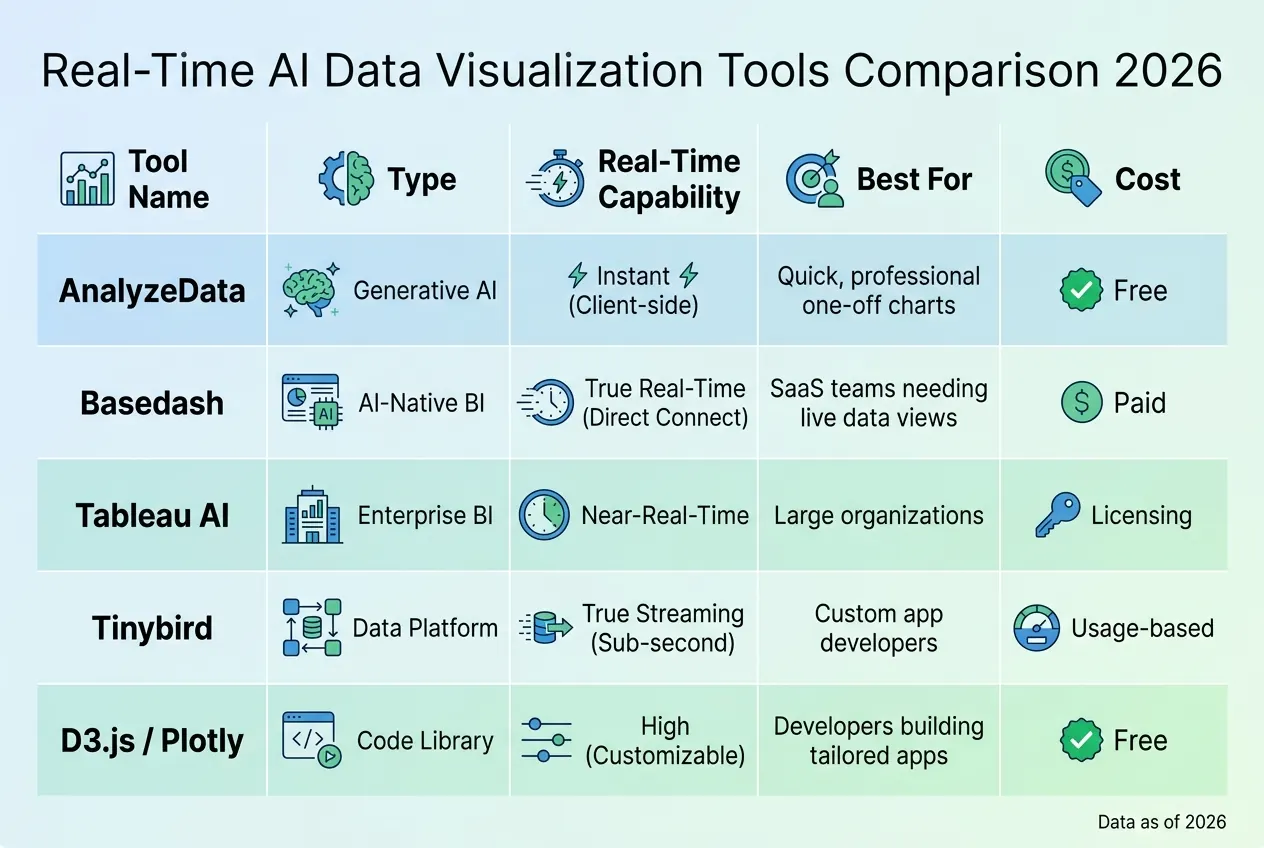
Here’s a quick comparison of some popular tools:
| Tool | Type | Real-Time Capability | Best For | Cost |
|---|---|---|---|---|
| AnalyzeData | Generative AI | Instant (Client-side) | Quick, professional one-off charts | Free |
| Basedash | AI-Native BI | True Real-Time (Direct Connect) | SaaS teams needing live data views | Paid |
| Tableau AI | Enterprise BI | Near-Real-Time | Large organizations | Licensing |
| Tinybird | Data Platform | True Streaming (Sub-second) | Custom app developers | Usage-based |
| D3.js / Plotly | Code Library | High (Customizable) | Developers building tailored apps | Free |
The right tool depends on your team’s technical expertise and whether you’re looking for quick visualizations or a robust production system.
Build Custom AI Agents for Data Streams
Custom AI agents let you control how data moves through your system. A secure and efficient approach involves using large language models (LLMs) to extract structured parameters from user queries. For example, a query like “total monthly revenue in USD by product category” can be parsed into structured data that queries a secure analytics backend. This method is much safer than allowing AI to write raw SQL queries, especially in environments with sensitive data.
Effective AI agents work through a cycle: they sense data (e.g., via Kafka), contextualize it using low-latency stores like Redis, make decisions with LLM inference, trigger downstream actions, and log results for continuous learning. In high-stakes scenarios like fraud detection, this entire process can take just 75 milliseconds - 40ms for data ingestion, 5ms for lookup, and 30ms for inference. These agents not only streamline operations but also improve agility, a critical factor for scaling.
For businesses looking to create tailored AI agents, experts like Patrick Frank offer services such as the 90-Day AI Build ($10,000), which provides end-to-end support from strategy to execution.
A 90-Day Plan to Build It
Breaking the implementation process into three phases ensures smoother execution:
Phase 1: Audit and Define (Days 1-30): Assess your data sources and define what “real-time” means for your business. Map your data schema so the AI understands key terms - e.g., ensuring “revenue” aligns with “gross_sales_usd”. Select a tool stack that matches your budget and team’s skills.
Phase 2: Build Core Logic (Days 31-60): Set up Change Data Capture or streaming connectors to feed live data into your system. Create an agent architecture that translates natural language into structured queries. Use a three-layer design: frontend (e.g., React for real-time interfaces), API gateway (data aggregation and authentication), and AI/data layer (visualization and machine learning). This structure isolates failures and enhances reliability.
Phase 3: Deploy and Iterate (Days 61-90): Integrate interactive UI elements using libraries like D3.js or Plotly. Add AI-powered anomaly detection with real-time alerts. Roll out the solution to a pilot team and refine it based on their feedback. Implement caching strategies with time-to-live (TTL) settings - e.g., 10 seconds for real-time dashboards, 24 hours for daily reports.
Conclusion
Real-time AI visualization has transformed from a tedious manual process into an instant, game-changing tool. Today, founders can simply request something like "monthly revenue by product category" and receive a polished, professional chart in mere seconds. With over 78% of businesses now incorporating AI into at least one area of their operations, the gap between early adopters and those lagging behind continues to grow.
The advantages are undeniable: faster access to insights, easier data accessibility for every team member, and a shift from reactive reporting to proactive anomaly detection. According to Gartner, by 2027, 75% of new analytics content will be tailored for intelligent applications powered by generative AI. The tools being used today are setting the stage for tomorrow’s competitive edge.
Getting started is easier than ever. Free tools like AnalyzeData provide a quick entry point, while more advanced options like ChatGPT Plus are available for $20/month. For businesses aiming to create custom AI-driven solutions, the 90-Day AI Build offers a structured approach to move from planning to execution.
The key is to start small and build from there. Focus on a single dashboard, data stream, or team that would benefit from quicker insights. Craft clear prompts, verify results, and refine based on feedback. As Andrew Ng famously said, "AI is the new electricity that transforms data within seconds". Companies that embrace this transformation early will position themselves as leaders in their industries, equipped with the systems and scalability to drive growth.
For founders seeking expert guidance to implement AI agents and automation, Patrick Frank provides consulting services. These include a comprehensive 90-Day AI Build ($10,000) and personalized 1-on-1 Strategy Sessions ($150/hour) to help businesses turn concepts into production-ready systems.
FAQs
What counts as “real-time” for my dashboards?
“Real-time” in the context of dashboards means that data is updated within milliseconds or seconds after it's generated. This allows you to access continuously refreshed insights, ensuring you can make timely and informed decisions.
How do I keep AI-generated charts accurate (and prevent hallucinations)?
To keep AI-generated charts accurate and prevent misleading information, it's crucial to anchor the AI in verifiable data. Adding safeguards like validation layers and real-time monitoring plays a key role in maintaining reliability. Methods such as retrieval-augmented generation (RAG) and query validation ensure outputs are cross-checked against trusted sources. By combining these techniques with ongoing monitoring and well-placed guardrails, you can catch and fix errors, ensuring that visualizations remain grounded in factual and dependable information.
What’s the safest way to use natural-language queries with sensitive data?
To keep data safe, it's crucial to adopt secure access methods such as encryption, strong authentication, and data governance policies. AI systems should only handle sensitive information through secure and well-monitored channels. This approach not only safeguards the integrity of the data but also allows for the use of natural-language queries in a secure manner.