
Perplexity is best when I use it as a source-finding tool, not as the final answer. It can cut a research task that used to take hours down to a first pass in minutes, but the output only helps if I lock the date range, ask for source links, and check the claims on company sites, filings, reviews, and pricing pages.
Here’s the short version:
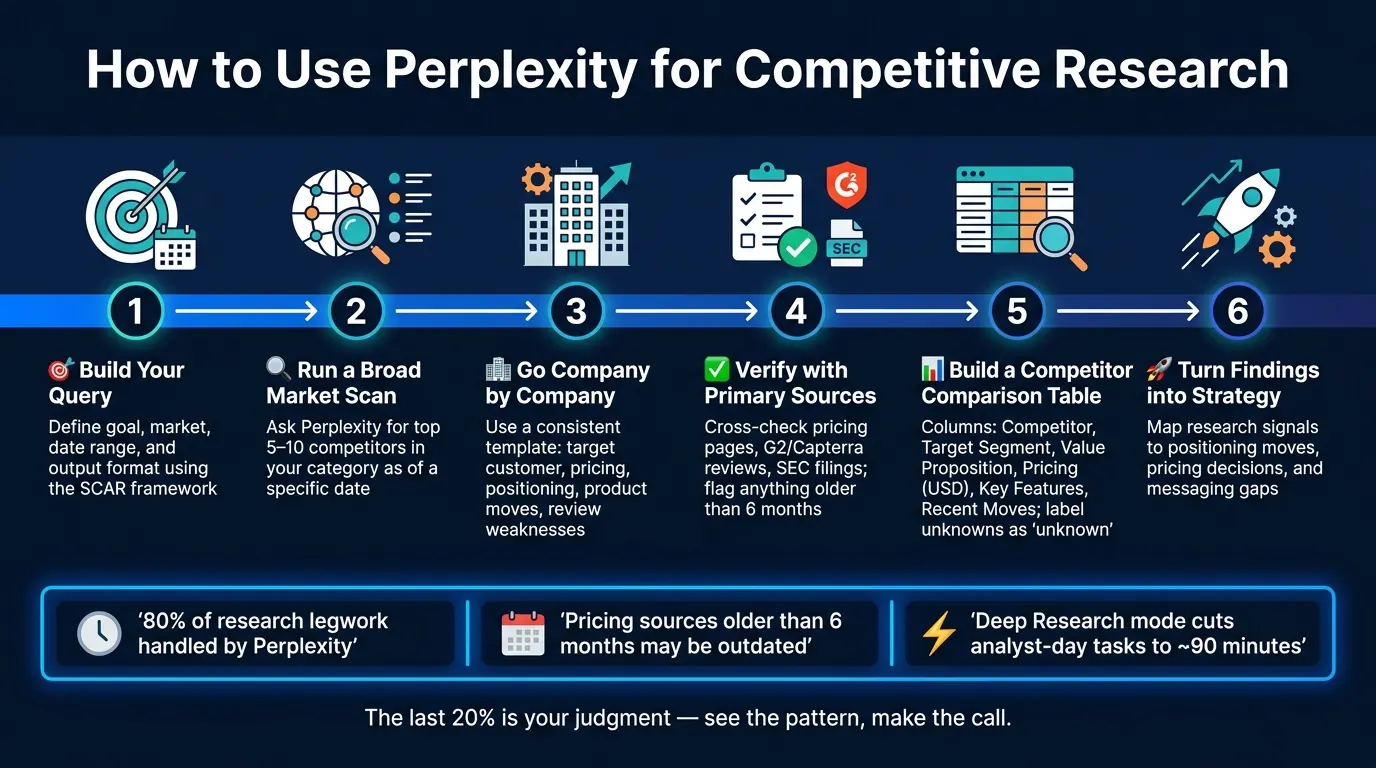
- I start with a clear query: goal, market, date range, and output format.
- I ask Perplexity to favor primary sources like pricing pages, SEC filings, and official announcements.
- I use follow-up prompts to narrow the list, compare top rivals, and turn notes into a short brief.
- I put the checked findings into a simple competitor table with fields like pricing, positioning, product moves, and review-based weak spots.
- I then use that research to make calls on pricing, messaging, segment focus, and AI workflow choices.
- If a fact is missing, I mark it as "unknown" instead of guessing.
A few points matter most:
- Recency matters. A pricing source older than 6 months may already be off.
- For product updates, a 90-day window often gives a cleaner view of what changed.
- For customer pain points, looking at the last 12 months on Reddit and G2 gives a better read than old reviews.
- The article’s workflow says Perplexity can handle about 80% of the research legwork, while the last 20% is still my judgment.
How To Use Perplexity AI For Market Research (Step-By-Step)
Quick comparison
| Step | What I ask Perplexity for | What I do next |
|---|---|---|
| Market scan | Top competitors in a category | Pick the top 3 to 5 |
| Pricing check | Tiers, monthly/annual cost, recent changes | Confirm on pricing pages |
| Positioning review | Homepage promise, target buyer, proof points | Compare message gaps |
| Pain point scan | Top complaints from reviews/forums | Look for repeated problems |
| Product move check | New launches and updates | Track where rivals are heading |
| Final output | Markdown summary or table | Turn it into a decision memo |
My takeaway: Perplexity helps me get to cited market facts fast. But the win is not the tool by itself. The win comes from using a repeatable process: ask better questions, check the sources, organize the findings, then make the call.
Build Better Queries for Competitive and Market Research
Query quality shapes result quality in Perplexity. A better prompt means less cleanup and more output you can use for pricing, positioning, and competitor analysis.
A Simple Query Framework: Objective, Market, Date Range, and Output
Build each query around four inputs:
- What decision is this research meant to support?
- Which market or segment are you looking into?
- What time window matters?
- What format should the answer use?
For more involved research, SCAR is a handy shorthand: Situation, Context, Ask, and Result format.
A strong prompt might look like this: "Compare current pricing and packaging for [A], [B], and [C] in [Industry] in North America, 2024–2026. Return a table with tier prices in USD, key features per tier, and source links."
Be explicit about the date range. Add phrases like "in the last 12 months", "as of Q2 2026", or "2024–2026" so Perplexity doesn’t blend old data with current signals.
If the stakes are high, say so in the prompt. Tell Perplexity to favor primary sources such as company pages, SEC filings, and regulatory bodies instead of blogs or news aggregators.
Prompt Patterns for Pricing, Positioning, Trends, and Claim Validation
Different research goals need different prompt shapes. Here’s a simple starting point:
| Research Goal | Prompt Pattern | Recommended Mode |
|---|---|---|
| Pricing | "Compare current pricing for [A, B, C]. Return tiers, monthly/annual cost in USD, and recent changes. Cite each claim." | Pro Search (Focus: Web) |
| Positioning | "Analyze homepage messaging for [A, B, C]. Return: main promise, target customer, top 3 proof points, and CTA." | Pro Search |
| Market Size | "What is the 2024–2025 TAM and CAGR for [Industry] in North America? Cite Gartner or IBISWorld. Note conflicting estimates." | Deep Research |
| Pain Points | "What are the top 5 complaints about [Competitor] on Reddit and G2 in the last 12 months? Provide verbatim quotes." | Focus: Social |
| Product Moves | "List product updates or major feature launches for [Competitor] in the last 90 days. Include source links." | Pro Search |
One line is worth adding to almost every pricing query: "Prefer the company's own pricing page as the source, and flag any citation older than 6 months." Pricing moves fast, so recency matters.
When you’re checking a market claim, ask Perplexity to separate vendor marketing claims from user-reported data in forums or reviews. That one instruction can save you from lumping polished sales copy together with what buyers are saying in public.
Use Follow-Up Prompts to Narrow, Compare, and Summarize
Treat the first result like a draft, not the finish line. The follow-up prompt is where things get useful.
If the first query brings back five competitors, your next prompt might be: "Of the companies listed, focus only on the top three. Exclude any results published before January 2024. Summarize the key differences in their pricing." Then you can turn that into something shareable with a third prompt: "Rewrite the above as a short competitor brief I can share with a client - two paragraphs, plain language, no jargon."
A good flow is simple: start with a broad scan, narrow to the top three competitors, then rewrite the findings as a client-ready brief. That sequence - broad scan, narrow comparison, final brief - is what turns raw search results into a usable research output.
These refinements turn raw search into a repeatable competitor workflow. Once the prompt is tight, the next step is verifying and structuring the findings.
A Step-by-Step Competitive Analysis Workflow in Perplexity
Start Broad, Then Go Company by Company
Begin with a market-level query before you dig into single companies. A Deep Research prompt like "Who are the top 5–10 competitors in [category] targeting [segment] in the U.S. as of Q2 2026?" gives you a cited list to work from.
Then go company by company using the same template each time. That way, you're not comparing apples to oranges. Focus on:
- target customer
- core offer
- pricing
- positioning
- recent funding
- product moves
- review-based weaknesses
That consistency matters. If one company gets a deep dive and another gets two quick notes, the whole comparison starts to wobble.
Verify Findings with Company Sites, Reviews, and Public Data
Before you use any number, check it against a primary source. That includes pricing, market size, and funding.
For pricing, compare what Perplexity finds with the company’s own pricing page, plus review sites like G2 or Capterra. Vendors often leave out mid-market or enterprise pricing, so review data can help fill in the picture.
For public companies, use Perplexity to locate the filing, then confirm the number in the 10-K or 10-Q. If sources clash on a market size figure, report the range and call out the mismatch instead of picking one number and moving on.
Turn Raw Findings into a Competitor Comparison Table
Once the main data points are checked, pull everything into one comparison table. A prompt like this works well: "Summarize the findings above into a Markdown table. Columns: Competitor, Target Segment, Core Value Proposition, Pricing (USD), Key Features, Recent Moves, Positioning. Flag any cell where the source is older than 12 months."
A five-competitor teardown takes about 30 minutes the first time and about 15 minutes with a saved prompt.
| Competitor | Target Segment | Core Value Proposition | Pricing (USD/mo) | Key Features | Recent Moves | Positioning |
|---|---|---|---|---|---|---|
| [Competitor name] | unknown | unknown | unknown | unknown | unknown | unknown |
If data is missing or not confirmed, label the cell "unknown". Don’t guess. Unknown is better than a guess.
This table makes it much easier to spot gaps in pricing, messaging, and segment focus before you move into positioning analysis.
Turn Research into Positioning and Strategy Recommendations
Use your research table to spot gaps, pains, and claims your brand can own. Then turn those gaps into a brand angle that feels clear and hard to confuse with everyone else. From there, make a direct positioning choice.
Find Positioning Gaps and Whitespace in the Market
Once your comparison table is done, don't read it like a stock list. Read it for patterns. The goal is to see where no one has planted a flag.
A simple Perplexity prompt like "Based on these competitor positioning statements, what market gaps exist for a brand targeting [segment] in the U.S. over the last 12 months?" can surface angles you'd miss in a manual review. Focus on what competitors ignore, not what they keep saying.
If five out of six competitors lead with "enterprise-grade" and "scalability", that tells you something. The mid-market or self-serve segment may be open. Plot where competitors bunch up using variables like price vs. complexity or niche vs. broad appeal, and the whitespace gets easier to spot.
That gap analysis should connect straight to customer pain points and category language.
Pull Out Customer Pain Points and Category Messaging Patterns
Websites show claims. Reviews and forums show what using the product feels like. That gap is often where differentiation shows up.
Use Perplexity's Focus: Social mode to search Reddit, G2, and LinkedIn for raw feedback. A prompt like "What do users complain about most regarding [product category] in the last 12 months?" pulls signals that homepage copy won't show. Watch for repeated frustrations, like hidden fees or slow onboarding, across more than one competitor. If the whole category shares the same weakness, that's your opening.
It's also worth scanning competitor homepages for repeated buzzwords. When every company leans on the same language - "efficiency", "ROI", "seamless" - those words lose punch. What's missing from category messaging can matter more than what's there. Repeated complaints can become differentiation themes, not just notes in a research doc.
Build Strategy Tables from the Research
Use the same schema for every competitor - Product, Pricing, Positioning, and SWOT - so outliers stand out fast. Once you can see the pattern, tie each signal to a specific brand move:
| Research Signal | Positioning/Strategy Response |
|---|---|
| Competitor leads with "Ease of Use" | Position as the advanced, high-control option |
| Recurring complaint: "Hidden Fees" | Lead with "Transparent, All-In Pricing" messaging |
| Trend: Shift to AI-based reconciliation | Highlight "Human-in-the-loop" for higher accuracy and trust |
| Gap: No mobile-first solution for SMBs | Launch and lead with "Mobile-First Operations" angle |
A second table can compare current category norms with angles your brand could own:
| Category Positioning Norms | Possible Differentiated Brand Angles |
|---|---|
| Enterprise-grade, complex, high-cost | "Self-serve, 5-minute setup for mid-market" |
| Generalist tool for all industries | "The only [tool] built specifically for [niche]" |
| Focus on "Features and Specs" | Focus on outcome-first messaging |
| Stable, slower-moving | "AI-native, weekly feature updates" |
These tables should drive decisions, not just sum up data. Every row should point to a move: a headline, a pricing page change, an offer tweak, or a segment choice. Start with the strongest gap, then use it to shape the next brand, pricing, or offer decision. Those moves become inputs for the brand, growth, and planning choices that come next.
How to Use Perplexity for Market Research Before Starting a Business
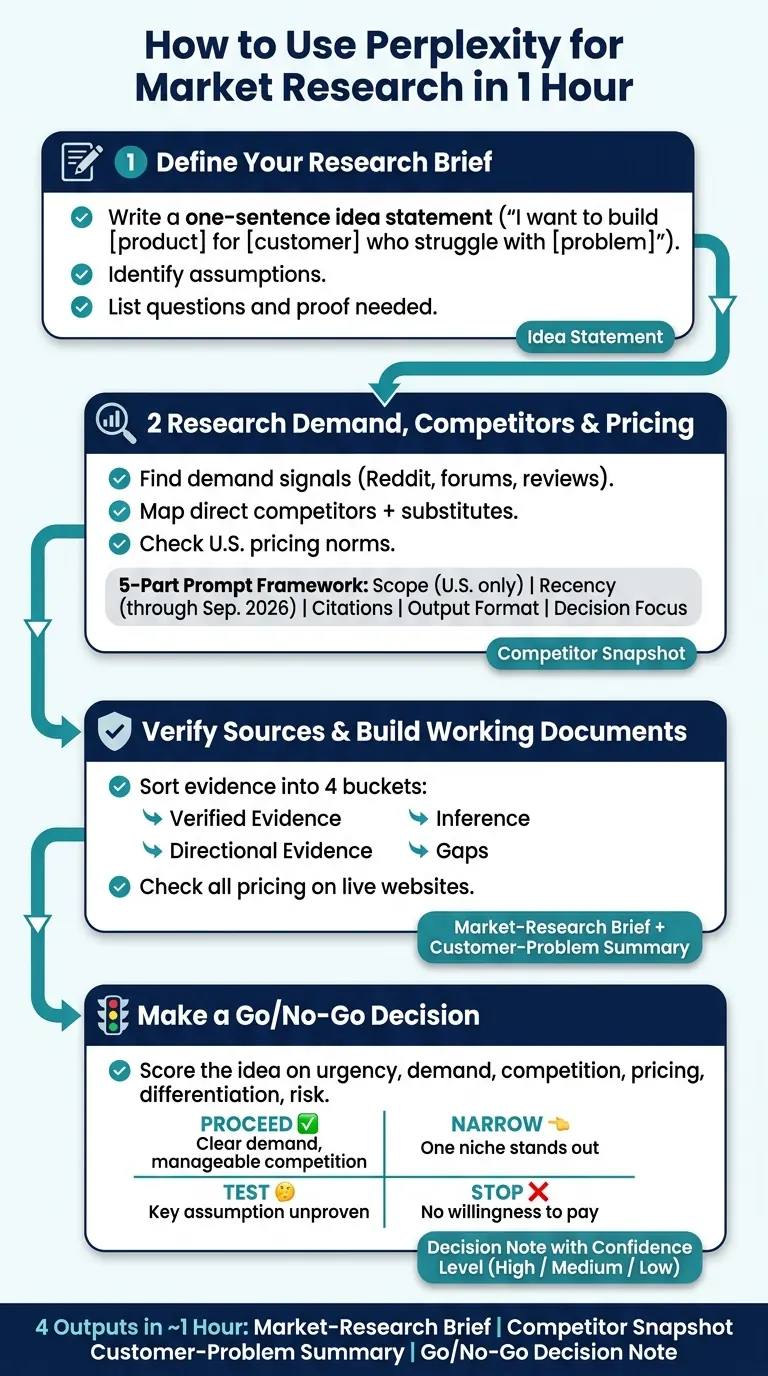
You can use Perplexity to check a business idea in about 1 hour before you spend months building the wrong thing. I’d use it to answer five questions fast: Is the problem real? Are people in the U.S. paying for fixes? How crowded is the space? What do prices look like in USD? And is there still a gap worth testing?
Here’s the short version:
- I start with one clear idea statement
- I ask Perplexity to list assumptions, questions, and proof needed
- I look for demand signals in cited sources, Reddit, forums, and reviews
- I compare direct competitors, substitutes, and pricing
- I verify claims by hand, especially pricing on live sites
- I turn the research into 4 outputs:
- a market-research brief
- a competitor snapshot
- a customer-problem summary
- a go / no-go decision note
This process is not for perfect certainty. It is for making a better call with less guesswork. If I can find repeated pain points, proof of spending, and room to stand out, I move to a small test. If I can’t, I narrow the idea or stop.
One useful way to think about it: if even 1 weak assumption can break the idea, that assumption should be the next thing I test.
| What I’m checking | What I want to find |
|---|---|
| Demand | Repeated pain, urgency, and signs people already spend money |
| Competition | Who already serves the market and where they fall short |
| Pricing | What buyers expect to pay in the U.S. and how rivals charge |
| Gaps | Missing features, bad user feedback, or weak substitutes |
| Decision | Proceed, Narrow, Test, or Stop |
1. Define Your Research Brief Before You Search
A research brief helps keep Perplexity locked on one launch decision. Before you type anything, write down the product or service, the target customer, the problem that customer is dealing with, the U.S. market you want to study, how the business will make money, and the decision this research needs to support.
Don’t stop at age, income, or job title. Add the customer’s motivations and buying habits too. Why do they buy? What slows them down? What pushes them to act? That brief becomes the filter for every search you run.
Start With a One-Sentence Idea Statement
Before you open Perplexity, write your idea like this: "I want to build [product or service] for [specific customer] who struggle with [specific problem]."
It’s simple, but it does a lot of work. It forces you to get specific about what you’re building, who it’s for, and why it matters.
Then paste that sentence into Perplexity and ask it to list:
- assumptions
- follow-up questions
- the evidence needed to test them
That gives you a cleaner starting point than tossing in a broad search and hoping something useful comes back.
Use a Prompt Framework for U.S. Market Research
A vague prompt usually leads to a vague answer. So give each Perplexity query the same five-part structure:
| Prompt Element | What to Include |
|---|---|
| Scope | U.S. only |
| Recency | Current through Sep. 2026 |
| Citations | Authoritative sources with direct links for each claim |
| Output format | Evidence, Assumptions, Uncertainties, Implications |
| Decision focus | Go/no-go for [idea] |
This setup keeps the research tight and makes results much easier to compare across searches. The "Uncertainties" section matters a lot because it shows where Perplexity is making an inference instead of pointing to a direct source.
Use this brief to test demand, competitors, and pricing in the next step.
2. Research Demand, Customer Problems, and Competitors
This step is about checking three things: demand, competitor positioning, and pricing.
Find Evidence of Demand and Unmet Needs
Start with Perplexity. Ask it to show who has the problem, how common it is, and what people do right now to deal with it. A good prompt looks like this: "Who in the U.S. experiences [problem], and what workarounds or tools do they currently use to manage it? Cite sources published after Jan. 2024."
Then go straight to places where people speak plainly: Reddit, niche forums, and review sites. Look for phrases like "I wish…" or "How do I solve…?" That’s where you’ll find frustration in plain English. If the same complaint keeps showing up across different sites and from different users, pay attention. That usually points to a real gap, not a random complaint.
As you review what people are saying, capture:
- the segments hit hardest
- repeated pain points
- signs of urgency
- open questions people still can’t answer
Once you have those pain points, check which competitors handle them well and which ones fall short.
Map Competitor Positioning, Substitutes, and Pricing
Use those demand signals to judge where current offers miss the mark. Then map out who already serves the market. Ask Perplexity for direct competitors, indirect options, and niche players. Don’t ignore substitutes. A DIY workaround, like a spreadsheet or a manual process, can tell you a lot about unmet demand.
For each competitor, have Perplexity pull:
- target customer
- core promise
- pricing model
- complaints from review sites like G2 or Reddit
A useful gap-analysis prompt is: "Based on user reviews on G2, Capterra, or Reddit, what are the most common complaints or missing features for [Competitor Name]?"
One big caution here: always check pricing on the competitor’s live website. AI pricing data can go stale.
Keep your notes short. A one-line summary per competitor makes it much easier to compare positioning fast.
The goal here is simple: anchor your positioning against other choices in the market, not just your product features.
Then compare those offers with category pricing and demand trends.
Check Market Trends and U.S. Pricing Norms
The last pass tells you whether the category is growing, shrinking, or changing shape. Ask Perplexity for category pricing benchmarks so you can see what U.S. buyers already expect to pay.
| Source Type | Checks | Limits |
|---|---|---|
| Industry report | Category direction and pricing context | Broad definitions |
| Review or forum post | Recurring pain points and workarounds | Small samples and bias |
| Competitor pricing page | Current pricing model and entry price | Verify on the live site |
"Pricing is the moment of truth - all of marketing comes to focus in the pricing decision." - E. Raymond Corey, Professor, Harvard Business School
Don’t just log cited facts. Flag your inferences too. Those are often the loose threads that need validation next.
Next, sort the strongest sources and turn them into a working brief.
3. Check Your Sources and Turn Findings Into Working Documents
Now take the best findings and turn them into evidence you can rely on. Perplexity notes are a starting point, not the final word. Before you use them to guide a decision, check them by hand.
Sort Evidence by Strength and Reliability
Every claim from Step 2 needs a quick manual review. Open each Perplexity citation, read the source itself, and ask two simple questions: Does this source back up the claim? And is it current enough to matter?
Then sort each finding into four buckets:
- Verified evidence - the source clearly backs up the claim and is recent enough to matter
- Directional evidence - the source is related, but it’s older or only partly backs up the claim
- Inference - your read of a pattern, not a direct quote or hard data point
- Gaps - places where you still don’t have a solid source
If AI surfaces pricing, treat it as unverified until you confirm it on the live pricing page.
Before you write the brief, run an audit prompt to catch holes or conflicts in the evidence. Use this prompt:
"List the main sources supporting demand, competition, and pricing in [your category]. Note publication dates and flag contradictions."
Build the Market-Research Brief and Customer-Problem Summary
Once your evidence is sorted, turn your notes into two working documents that help you make a call.
First, create a market-research brief. Include the idea, scope, target customer, demand evidence, competition, pricing norms, trends, unmet needs, assumptions, limits, and the next test.
Then create a customer-problem summary. Spell out who has the problem, how often it comes up, what people do now, and where current options fall short.
"If you can demonstrate that customers actually need a product and are willing to pay for it, everything else will flow from there." - Michael Lepech, Stanford University
The point here is simple: make your assumptions and blind spots easy to see. These documents become the base for your go/no-go decision.
4. Make a Go/No-Go Decision and Pick Your Next Test
Use your market-research brief and customer-problem summary to make the launch call. Then use Perplexity to stress-test the evidence before you decide.
Use a Simple Decision Framework: Proceed, Narrow, Test, or Stop
Ask Perplexity to score the idea using only verified sources from your research. This prompt works well:
"Using only verified sources from this research, score this idea on customer urgency, evidence of demand, competition, pricing potential, differentiation, distribution feasibility, and execution risk. Flag any factor where the evidence is weak or missing."
Once you have the score, pick one of four paths:
| Decision | When It Applies | Next Step |
|---|---|---|
| Proceed | Clear demand, identifiable customers, manageable competition | Move to launch planning |
| Narrow | Broad interest, but one niche or feature stands out | Refocus the offer on that segment |
| Test | Uncertain demand or a critical assumption still unproven | Run an MVP, landing page, or early-access offer |
| Stop | No evidence of willingness to pay or risk you can't get around | Return to research or abandon the idea |
This keeps the decision grounded in evidence instead of gut feel. If the signals are strong, move forward. If one part of the market stands out, tighten the focus. If the big question is still unanswered, run a small test before you put more time or money on the line.
Final Output: Decision, Confidence Level, and Next Validation Step
Write a short decision note with six items:
- Final decision
- Confidence level
- Positioning hypothesis
- Key risks
- Next validation step
- Success threshold
Use High, Medium, or Low for confidence based on source freshness and verification.
For example, if you land on Test, the next move could be a simple landing page or early-access offer with a clear success threshold, like getting 100 users within two months.
Perplexity helps you move through this step faster, see your sources more clearly, and zero in on the assumptions that carry the most risk before you commit to a launch.
How Perplexity Fits into Patrick Frank's Consulting and AI Execution Workflows
The point of the research table isn't to sit in a doc and look neat. It's to help make a call on positioning, pricing, or automation.
Use the table as a decision memo. That means taking the competitor tables, whitespace analysis, and validated claims from earlier sections and turning them into inputs for brand, growth, and financial planning work. Instead of just describing the market, you're using the market to choose the next move.
Feed Research into Brand, Growth, and Financial Planning
Research should shape segment choice, pricing bands, and value proposition, not just back up what you already thought. It gives you cited market signals you can point to instead of leaning on gut feel alone.
From there, turn the findings into working inputs for:
- Pricing
- Messaging
- Forecast assumptions
For financial planning and modeling, query for unit economics and pricing benchmarks so the numbers in your model tie back to current market data. A prompt like "SaaS pricing benchmarks for mid-market buyers" gives you inputs you can actually plug into a model.
Use Research to Shape AI Agent and Automation Decisions
The same approach works for AI planning too. Use research to sort out what's live in the market from what's mostly hype.
Before scoping an AI Agent Strategy, AI Workflow Automation System, or 90-Day AI Build, research should answer a few basic questions:
- Where are competitors already using AI?
- What workflow bottlenecks are customers complaining about?
- What competitors have actually shipped versus what they only claim?
Perplexity's Deep Research mode can shrink work that used to take a full analyst day into roughly 90 minutes. That output then becomes the brief for deciding which automations to prioritize, which tools to review, and where a human-in-the-loop setup still makes more sense than full automation.
Conclusion: Use Perplexity as a Verified Research System, Not a Shortcut
Use the same workflow each time: precise questions, date-locked queries, source checks, and structured outputs that turn research into decisions.
Perplexity handles the first 80% of a market research task, replacing hours of manual Google searches and industry reports. The last 20% is judgment: seeing the pattern, making the call, and turning the brief into execution.
FAQs
When should I use Deep Research instead of Pro Search?
Use Pro Search for fast, one-off tasks or a quick snapshot. It works well when you need to check a competitor’s latest news or verify a market stat.
Use Deep Research for more involved work that pulls information from multiple sources. It’s a better fit for jobs like competitor landscape reviews, market segmentation, or benchmark analysis. Think of it as the tool for the heavy-lifting part of research.
How do I verify Perplexity’s citations before using them?
Check every citation with care. Make sure the link opens, the source page loads, and the cited point is actually on the page. Then search that page for the exact keyword, phrase, or number used in the draft. If you can't find it, or if the source only sort of hints at it, ask Perplexity to find a better source for the claim.
For high-stakes points, don't stop at one source. Confirm each one with 2–3 independent sources and make sure the information is current. When possible, use primary sources first, like SEC filings, company reports, earnings releases, court records, or official data pages, instead of blog roundups or summary posts.
What should I do when competitor pricing or features are unclear?
Treat unknown as a valid finding, not a blank space to fill with guesses. Use specific, date-locked queries like "in 2025–2026" so you don't pull in old info by accident.
Check vendor websites against review platforms like G2 or Capterra. It also helps to look for leaked RFP documents. If a claim doesn't have a source, treat it as hearsay. And if you still can't verify it, record it as unknown.
How do I know if a market gap is real?
A market gap is only real when it points to existing demand and a problem people already want solved. Weak competition by itself doesn't prove much. Sometimes a market looks open simply because no one cares enough to enter it.
A better signal is this: people are already spending time or money on substitutes, patchwork fixes, or clunky workarounds. That tells you the pain is there. You should also look for unprompted complaints on Reddit, niche forums, review sites, and community threads. When people complain without being asked, that's often where the truth slips out.
Next, check the gap with objective competitor mapping and current public pricing. Who already serves this need, even partly? How are they positioned? What do they charge? This step helps you tell the difference between a gap in the market and a gap in your own research.
After that, run a commitment test. Not a survey. Not polite feedback. Something concrete, like deposits, paid pilots, or another form of clear buyer commitment. Set kill criteria ahead of time so you don't move the goalposts after the fact. If people won't pay or won't confirm the problem in a meaningful way, the gap isn't real.
What should I verify outside Perplexity?
Verify anything from Perplexity that involves pricing, product claims, or live facts. Go to the competitor’s own website and check each price and claim there, because models can be stale or just plain wrong.
Then confirm demand with primary proof: deposits, paid pilots, pre-orders, or LOIs. On top of that, test your assumptions with real buyer interviews and landing pages or priced smoke tests. The goal is to measure action, not just interest.
What’s the best first test before launch?
The best first test before launch is customer pre-sales that show people are willing to pay. Ask for a deposit, a paid pilot, or an LOI instead of leaning on praise or soft feedback.
You can also run a “fake door” waitlist to measure intent.