
If I had to sum up the article in one line, I’d say this: AI agents work toward a goal, use software tools, keep track of context, and stop for human review when the task carries risk. That’s why they fit jobs like support triage, lead routing, research briefs, and CRM cleanup better than a basic bot or a fixed automation.
Here’s the short version:
- Chatbots reply to prompts. AI agents work toward an outcome.
- Automations follow fixed rules. AI agents can plan, act, check results, and try a different path when needed.
- Most agents run on a simple loop: observe, plan, act, review.
- The main parts are goal, planning, tools, memory, orchestration, and guardrails.
- They work best on repeatable, multi-step tasks with clear inputs and clear outputs.
- High-risk actions should still have human approval, like refunds, legal docs, or financial changes.
- Business value comes from time and labor savings: support can be 25%–40% faster, lead response can drop from 4 hours to under 5 minutes, and many teams target 3x–5x ROI in 12–18 months.
- A smart first step is a narrow pilot with clean data, limited permissions, and a clear baseline.
If you want the plain-English takeaway: an AI agent is software that can do work across tools with less hand-holding than a chatbot and more judgment than a simple rule-based flow.
| Type | What it does | Best for |
|---|---|---|
| Chatbot | Answers one message at a time | FAQs, simple support, basic Q&A |
| Automation | Follows a fixed if-then rule | Repetitive single-step tasks |
| AI agent | Pursues a goal across multiple steps and tools | Support triage, lead qualification, research, back-office work |
I’d read the rest of the article as a simple map: what agents are, how they work, where they fit, and how to start without creating a mess.
AI Agents Explained For Beginners
What an AI agent is and how it differs from chatbots and automations
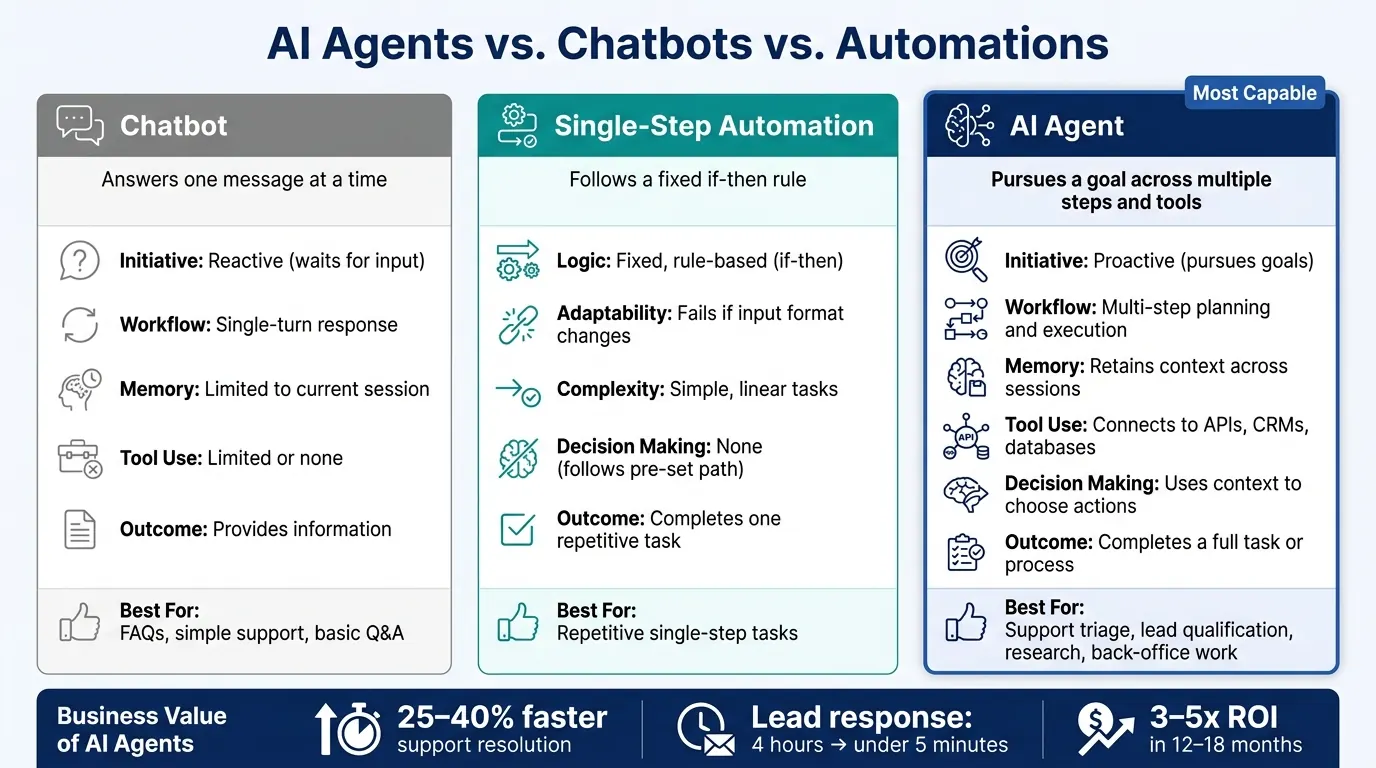
The simplest way to understand agents is to compare them with tools people already know.
An AI agent starts with a goal, reads the context it has, uses tools, and keeps working until it reaches a result or hands off to a human. The big difference is its ability to handle multi-step work across tools without someone directing each move.
"Agents are fundamentally about adding human-like decision making to automation - handling the qualitative judgments that previously only people could make." - Dominick Ng, Director of Engineering, Relevance AI
AI agents vs. chatbots
A chatbot handles one message at a time. You ask, it answers.
An agent works toward an outcome. Say the goal is "qualify inbound leads." The agent can pull records from a CRM, decide what to do next, and flag unusual cases for review. That means it moves from intake to action without waiting for another prompt.
| Capability | Chatbot | AI Agent |
|---|---|---|
| Initiative | Reactive (waits for input) | Proactive (pursues goals) |
| Workflow | Single-turn response | Multi-step planning and execution |
| Memory | Usually limited to current session | Can retain context across sessions |
| Tool use | Limited or none | Connects to APIs, CRMs, databases |
| Outcome | Provides information | Completes a task or process |
AI agents vs. single-step automations
A single-step automation follows a fixed rule: if a form is submitted, send a confirmation email. Change the input, and the automation can break.
An agent handling that same trigger looks very different. It might enrich the new lead, evaluate fit, route the record for follow-up, and write a plain-language summary of why the lead is or isn't worth pursuing. And if something unexpected shows up, it can adjust. Instead of crashing, the agent replans.
| Capability | Single-step Automation | AI Agent |
|---|---|---|
| Logic | Fixed, rule-based (if-then) | Dynamic reasoning and planning |
| Adaptability | Fails if input format changes | Observes changes and replans |
| Complexity | Simple, linear tasks | Complex, open-ended workflows |
| Decision making | None (follows pre-set path) | Uses context to choose actions |
Those differences come from what agents do behind the scenes: goals, reasoning, tools, memory, and controls.
How AI agents work behind the scenes
Most agents run on a simple loop: observe, plan, and act. They take in context, split a goal into steps, use tools, check what happened, and adjust if needed. The main parts are goal setting, planning, tools, memory, and controls.
Goals, reasoning, and step-by-step planning
An agent doesn’t take a vague prompt and just wing it. It tightens the goal into something specific, puts guardrails around it, and then breaks the work into smaller actions it can carry out.
For example, “qualify leads from last week’s webinar” can turn into a set of tasks like:
- Pull the attendee list
- Check each contact against CRM records
- Score each lead by fit criteria
- Flag the top 10 for sales review
Some agents reason step by step or weigh a few paths before picking one. The day-to-day takeaway is straightforward: narrower goals lead to more predictable agents. The more specific the instruction, the less space the agent has to drift off-script.
Tools, memory, and connected systems
Tools are the approved actions an agent can take. That might mean querying a CRM like Salesforce to update records, sending email through Outlook, checking a calendar, or searching an internal knowledge base.
Memory works in two layers. Short-term memory keeps track of the current task so the agent doesn’t lose the thread halfway through a workflow. Long-term memory pulls from a searchable store of past interactions and internal knowledge, which helps the agent tailor replies and hand off cleanly to a human. Without that layer, it starts from zero each time.
A research agent, for example, can search internal docs, summarize findings, and hand a short brief to a sales or strategy team.
Orchestration, approvals, and safety controls
The orchestration layer manages tool calls, retries, and handoffs between agents. It keeps the process moving so one failed API call doesn’t bring the whole workflow to a halt.
Human-in-the-loop (HITL) review means the agent stops and waits for a person to approve high-stakes actions, such as refunds, legal documents, or financial updates. Human review is standard for high-stakes actions.
These parts work as a system. If one piece is missing, the agent becomes less useful, less safe, or both. Here’s how the main parts fit together and what tends to fail when one isn’t there:
| Component | What it does | Typical business configuration | Risk if missing |
|---|---|---|---|
| Goal/Instruction | Defines the desired outcome | "Qualify leads from last week's webinar." | Agent performs random, unhelpful tasks |
| Reasoning/Planning | Breaks goal into steps | Step-by-step or multi-path reasoning | Agent gets stuck on complex steps or loops |
| Tools/APIs | Allows the agent to act | Access to Salesforce, Slack, or Gmail | Agent can reason but cannot act |
| Memory | Provides context and history | Searchable store of past customer interactions | Agent repeats mistakes or lacks personalization |
| Orchestration | Routes calls and manages failures | A central logic layer that sequences agent actions | System stalls when a single tool fails |
| Guardrails | Limits agent permissions | Human-in-the-loop for payments over $500 | Financial loss or unauthorized data access |
In practice, agent reliability usually depends more on clean, accessible data than on the model itself.
With those core parts in place, the next step is seeing how they show up in actual business workflows. That’s where this starts to feel less abstract - in customer support, lead qualification, research, and operations work.
Common AI agent workflows in real businesses
Once goals, tools, memory, and approvals are set, agents start to look less like a sci-fi idea and more like repeatable business workflows.
Customer support agents and lead qualification agents
A customer support agent kicks in when a ticket comes in. It reads the message, checks the customer’s purchase history, searches an internal knowledge base, and then does one of two things: solves the issue or passes it to a person with a summary ready for handoff. If something falls outside the rules, it gets routed to a human.
A lead qualification agent starts when someone submits a form. It fills out the contact record, applies your scoring rules, updates the CRM, and pings the sales team when a lead looks like a good fit.
| Workflow | Manual process | AI agent process | Primary business result |
|---|---|---|---|
| Customer support | Human triages ticket, searches docs, and drafts reply | Agent checks CRM, queries knowledge base, and resolves or escalates with a summary | Resolution time / CSAT |
| Lead qualification | Sales rep manually reviews form data and scores leads | Agent enriches the record, applies scoring logic, updates CRM, and alerts sales | Lead response time / Conversion rate |
You see the same setup in research and back-office work too.
Research agents and operations assistants
A research agent is made to gather and summarize information. Give it a goal, like a competitive market scan or a literature review, and it searches multiple sources, cross-checks findings, and puts together a structured brief your team can use. In day-to-day work, research agents speed up sourcing, comparison, and briefing. The point isn’t novelty. It’s faster, more structured decision support.
Operations assistants take care of the repetitive admin work that eats up hours every week: extracting data from invoices, matching records, scheduling meetings, and flagging exceptions. AI-led data entry can save the average accountant about 120 hours per year, and automated reconciliation tools can cut month-end closing cycles by 40% to 60%. One guardrail matters here: large transactions should still need human sign-off.
Where AI agents fit in your business and how to start responsibly
How to choose the right first workflow
A good first use case for an AI agent is work your team already does by hand, over and over, and at scale.
Think:
- first-response support triage
- inbound lead routing
- research summaries
- CRM data clean-up
These are strong starting points because they have clear inputs, clear outputs, and a human fallback. They also depend on the same goals, tools, and approvals covered earlier in this guide.
Before you pilot anything, map the systems the agent needs to touch, such as your CRM, help desk, email, and internal docs. If your data is messy or your integrations are broken, fix that first. Clean, connected data comes before tool setup. After that, test edge cases.
It also helps to begin with a partially autonomous agent. Let it handle routine steps, then send exceptions to a person. Pilot one workflow, track the result, and expand from there.
Once the workflow is scoped, measure it against your current baseline.
How to measure value in business terms
When an agent is live, compare performance against a clear baseline. Use plain business numbers, not vague impressions.
| Workflow | Baseline | After agent | Result |
|---|---|---|---|
| Customer support triage | High cost per ticket | 25–40% faster resolution | 3–5x ROI in 12–18 months |
| Inbound lead routing | 4-hour response time | <5-minute response time | Higher lead conversion rates |
| Research summarization | 10–15 hours per report | 6–8 hours per report | 30–40% faster innovation cycles |
| CRM data clean-up | 20 manual hours/week | 2 automated hours/week | 90% reduction in manual data entry labor |
Enterprise-grade agent deployments typically return 3–5x ROI within 12–18 months. That gives you a solid benchmark if you start with the right workflow and keep measurement tight.
What beginners should remember about AI agents
AI agents are goal-driven systems. They plan steps, use tools, store memory across a task, and loop through actions until the goal is met.
They make the most sense in multi-step workflows where the process repeats, but the inputs change. That’s where they can save time without forcing your team into a rigid script.
They also need guardrails:
- clean data
- scoped permissions
- audit trails
- human checkpoints for high-stakes work
Without those controls, mistakes can pile up quietly.
Start small. Measure the baseline. Keep human review in place for high-stakes steps. A narrow first workflow, with people handling exceptions, is usually the smart way in.
FAQs
What tasks should not be fully automated by an AI agent?
AI agents shouldn't fully automate high-stakes or judgment-heavy actions that need human oversight. That includes things like approving large refunds, sending legal documents, or bypassing required compliance or validation steps in regulated workflows.
They can still take on multi-step tasks. But for critical decisions, humans need to stay in the loop. And the agent should follow business policies and SOP logic instead of acting on autopilot.
How much data does an AI agent need to work well?
An AI agent doesn’t depend on some fixed amount of data. What matters more is the quality of the data and how easily the agent can reach it.
For the agent to work well, it needs secure access to the right information, such as emails, CRM records, and inventory logs. In practice, building that data layer is often the slowest part of the job. Teams can spend months cleaning messy data and putting the right security rules in place.
How do I know if my business is ready for an AI agent?
Your business is likely ready if it deals with large amounts of unstructured data like emails, documents, or calls. The same goes for teams with multi-step workflows that need coordination across different systems. It can also be a good fit for work that calls for nuanced judgment, as long as that work follows predictable, repeatable patterns.
A good place to start is one painful, repetitive workflow. That keeps the scope tight and makes it easier to see what’s working.
Success also depends on a few basics:
- A secure data fabric
- Clear processes
- Human oversight for auditability
Without those pieces in place, even a promising use case can get messy fast.