
A virtual assistant’s cost depends on location, skills, hours, and how you hire. Compare the full monthly bill - not just the hourly rate - and count your hiring and management time separately.
The main options come with different costs:
- Direct freelancer: You pay the assistant directly and handle hiring, training, payments, and replacement.
- Freelance marketplace: You pay for the work plus platform fees, with access to contract and payment tools.
- Managed VA agency: You pay a plan price that may include vetting, supervision, and backup coverage. Check the contract for limits.
Before choosing, request quotes for the same tasks, skill level, and monthly hours. Add software, payment fees, paid training, and setup charges. Then check minimum commitments, extra-hour rates, cancellation terms, and replacement coverage. The lowest listed rate is not always the lowest total cost.
1. Direct Freelancer
Rates by region and skill
Direct freelancers usually have the lowest listed rate, but you take on more admin work and replacement costs. Philippine direct-hire rates run $3–$12 per hour, according to OnlineJobs.ph; the cited U.S. benchmarks range from about $22.73–$50 per hour.[1][3][5] Assuming 160 paid hours per month, that works out to $480–$1,920 and $3,636.80–$8,000, respectively, before fees.[1][3][5]
Ask each candidate to quote the same scope, hours, availability, and skill level. Compare general admin support separately from specialist work, such as bookkeeping. These benchmarks are reference points, not guaranteed quotes.
Billing and service fees
Agree on hourly billing, a project fee, or a monthly retainer before work starts. Put the invoice currency, due date, included hours, overtime rate, unused-hour policy, minimum commitment, and cancellation notice in writing.[3]
Paying directly avoids marketplace fees, but transfer and currency conversion charges still matter. Compare those charges across Wise, PayPal, Payoneer, and bank transfers. Treat any paid job-board subscription as a recruiting cost.[3]
Hidden costs
Budget beyond the hourly rate. Include fees, tools, training, and your time, but track cash spending separately from the value of your own hours. You handle sourcing, vetting, invoicing, and finding a replacement. Written processes and shared password access that you can revoke can reduce the work involved when someone leaves.[3][6]
Hiring through a marketplace adds platform fees, which changes the total monthly cost.
2. Freelance Marketplace
Rates by region and skill
Freelance marketplaces reduce the work of finding candidates, but their fees add to your hiring costs. What you pay depends on the worker’s region, skills, contract type, and platform fees.
Upwork supports hourly contracts and fixed-price milestones. Fiverr packages usually cover specific deliverables. OnlineJobs.ph is a subscription job board, so you pay its fee separately from wages. Use fixed-price packages only when the deliverables are clearly defined.[2][3]
Billing and service fees
OnlineJobs.ph charges $69 per month for Pro or $99 per month for Premium, with no platform cut from wages. Upwork’s Basic plan adds a 5% marketplace fee, plus contract-initiation fees ranging from $0.99 to $14.99.[2] Fiverr also charges service fees.[3]
Upwork includes contracts, time tracking, and payment protection.[3] It does not cover turnover, so you still need a plan to replace someone who leaves.[3][6] Platform fees are the main reason your total can exceed the listed rate.
Monthly total
For hourly work, multiply the hours by the rate. For fixed-price work, add up the packages. Then add platform fees, payment charges, and software seats. Count any recruiting subscription separately so it doesn’t get mixed into wages.[2][3][4]
Track your time separately from cash spending. Budget for 20 to 40 onboarding hours and 3 to 5 management hours per week during the first 90 days, then add the value of that time to your monthly total.[4]
3. Managed VA Agency
Managed agencies cost more, but they reduce the time you spend recruiting and supervising a VA. The higher retainer usually covers support, backup coverage, and management.[1][6]
Rates by region and skill
7 Virtual Assistant Services (7VAS) lists offshore plans at $699 per month for 80 hours or $999 for 160 hours. Its bilingual Latin America plans cost $1,199 for 80 hours or $1,899 for 160 hours.[1]
Billing and service fees
7VAS says its plans are month-to-month, include backup coverage and a quality-control reviewer, and have no recruitment or placement fees.[1]
Before signing, get the extra-hour rates, unused-hour rules, cancellation notice, setup fees, and payment charges in writing.
Check what backup coverage means: Who replaces your VA? How soon can they start? What happens to your work during the gap?
All-in monthly cost
Start with the agency retainer, then add any setup fee, expected overages, and payment charges.[1] Agencies usually handle initial testing and tool training. You still need to supply process notes and clear expectations.[6][7]
For a fair comparison with a freelancer, ask for a written quote covering the same hours, skill level, and backup coverage.
Virtual Assistant Rates by Region and Skill
Region mostly reflects local labor costs, not work quality.[2][9] OnlineJobs.ph lists Philippine direct-hire rates of $3–$12 per hour.[3] The cited U.S. benchmarks range from about $22.73–$50 per hour, depending on experience and specialty.[1][5]
I’d use these ranges to check whether a quote is reasonable, then add the fees and onboarding costs covered in the next section.
Total Monthly Costs and Hidden Charges
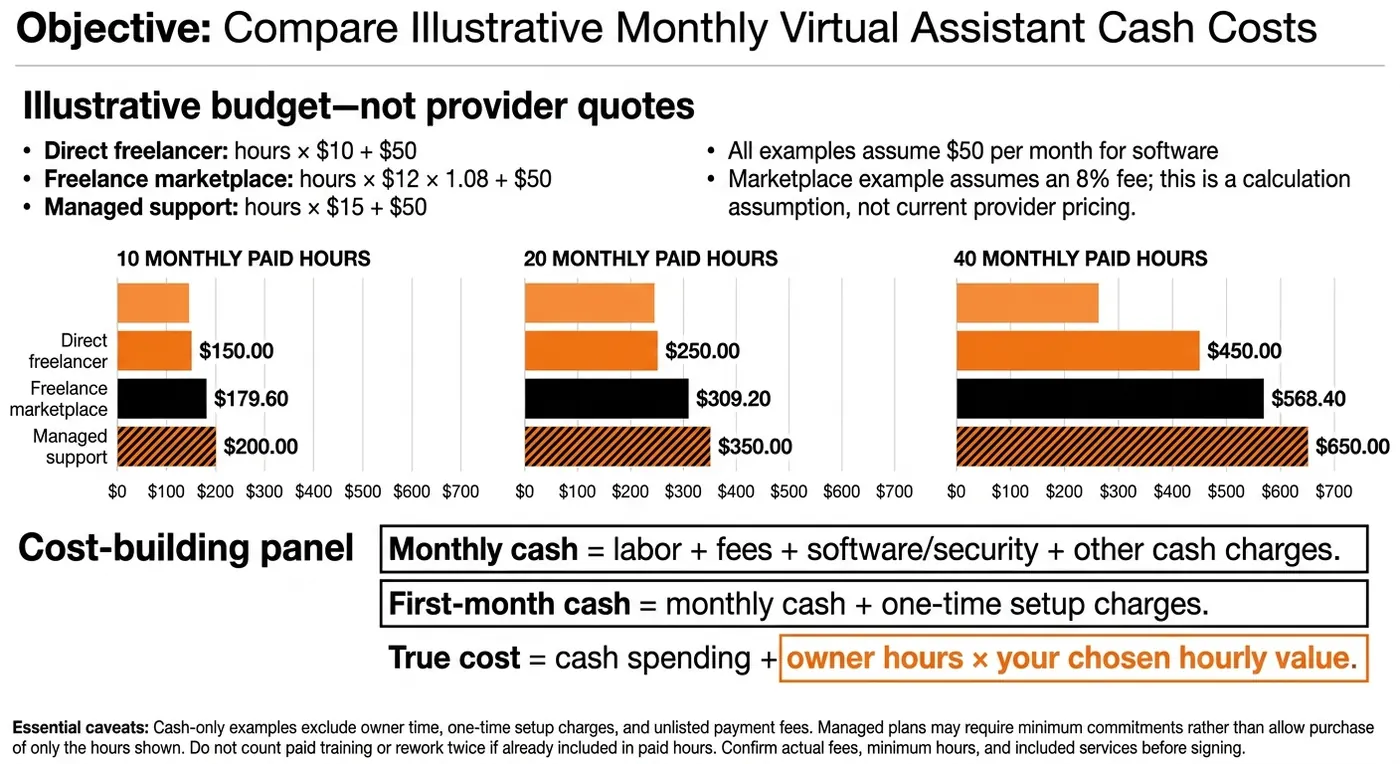
Your monthly bill includes more than the assistant’s hourly rate. Add fees, software, and other cash charges, then account for your time separately.
Separate cash spending from owner time. Use the figures below as budget assumptions, not live quotes. Confirm actual fees, minimum hours, and included services before signing.
| Cost component | Direct freelancer | Freelance marketplace | Managed VA agency |
|---|---|---|---|
| Labor: recurring cash | Rate × paid hours | Rate × paid hours | Plan price or rate × paid hours |
| Fees: recurring cash | Add payment fees | Add platform and payment fees | Check overage and account fees |
| Software: recurring cash | Add required seats and security tools | Budget for tools not included with platform access | Confirm included tools and access controls |
| Onboarding and management | Include paid training, access setup, and owner time | Include paid training, access setup, and owner time | Check setup charges and required owner involvement |
| Corrections and replacement | Budget for extra hours, recruiting, and retraining | Check correction terms and new-contract charges | Confirm correction and replacement coverage |
Monthly cash = labor + fees + software/security + other cash charges.
Use the table above to identify charges. The example below shows how those charges can add up.
Example inputs - not quotes: Use hourly rates of $10 for a direct freelancer, $12 through a marketplace, and $15 for managed support. These illustrative inputs fall within the source ranges discussed above.[1][2][8] For this calculation, assume $50 per month for software and an 8% marketplace fee. Neither assumption represents current provider pricing.
These cash-only totals exclude owner time, one-time setup charges, and unlisted payment fees. A managed plan may also require a minimum commitment rather than let you buy only the hours shown.
First-month cash = monthly cash + one-time setup charges.
If you use Hire Your VA Dream Team, record its setup fee separately from recurring assistant costs. Confirm the current fee before adding it to your budget.
True cost = cash spending + owner hours × your chosen hourly value.
Track onboarding, supervision, and corrections separately. Don’t count paid training or rework again if those costs already sit inside your paid hours. This is general budgeting information, not financial advice; an accountant can help with tax treatment.
| Hiring model | Cost advantage | Cost drawback |
|---|---|---|
| Direct freelancer | No marketplace markup | You cover recruiting, management, and replacement |
| Freelance marketplace | Payment and tracking tools may reduce admin work | Fees add to the assistant’s rate |
| Managed VA agency | Included supervision or replacement may reduce owner time | Minimum plans and excluded services can offset hourly savings |
Conclusion: Budget for the Total Monthly Cost
No hiring model is always cheapest. Direct hiring usually means the lowest cash fees but takes the most owner time. Marketplaces add platform fees. Managed support costs more upfront but includes supervision and backup. Compare the scope, not just the advertised rate.
Use the rate ranges above to request written monthly quotes for the same work. Check cancellation charges, minimum commitments, rollover rules, and exactly what management and backup cover.
For a cost-planning checklist, use The Ultimate VA Guide.
Your monthly budget should account for fees, tools, training, replacement costs, and owner time - not the hourly rate alone. This article provides general information, not legal, tax, or financial advice. Consult an accountant or lawyer about questions specific to your business.
FAQs
How much should I budget for unexpected VA costs?
Budget for more than the hourly or monthly rate. Include the time you’ll spend managing a virtual assistant (VA), checking in, correcting mistakes, and redoing work.
Turnover adds costs, too: recruiting, retraining, downtime, and the extra work you take on while finding a replacement. Together, these costs can wipe out the savings from hiring offshore or using a freelancer.
Add any platform, placement, or setup fees that apply. There’s no single extra amount to budget - it depends on which costs you’ll face.
When is a VA agency worth the extra cost?
A virtual assistant agency is worth the extra cost if you’d rather not recruit, vet, and train staff yourself. The price includes management, quality control, and backup coverage [1][2].
That extra support makes the most sense when downtime would cost your business, you don’t have the time or systems to manage a freelancer, or your growing workload would mean repeatedly finding and screening new hires [1][2].
How can I keep VA training costs down?
Document each process with a short screen recording and a written checklist so you don’t have to explain the same task repeatedly. That gives your virtual assistant (VA) a reusable standard operating procedure - a guide for completing the task - and saves you management time.
To help your VA work independently, define the expected outcome and agree on key performance indicators (KPIs): the measures you’ll use to judge the work. Use daily or weekly reports to check progress instead of watching every step. Keep your instructions consistent and communication clear so your training time goes further.