
You do not need to post every day to stay visible. What you need is a simple system: pick 3 to 5 topic pillars, keep everything in one content hub, turn one long-form piece into many smaller posts, use AI and scheduling tools to cut manual work, and review leads, clicks, and booked calls once a month.
Here’s the short version:
- Tie content to pipeline, leads, or sales.
- That keeps your message tight.
- or
can track ideas, drafts, dates, and results. - A blog, webinar, or memo can feed weeks of posts.
- The article shows a rhythm that can fit into about
plus one monthly deep work block. - Focus on
,
,
, and
instead of likes.
A steady 2-posts-a-week rhythm often does more for buyer trust than posting a lot one week and then going silent the next. The main idea is simple: stop posting one piece at a time and start running content like a repeatable system.
This article walks through that system from start to finish in plain steps you can use right away.
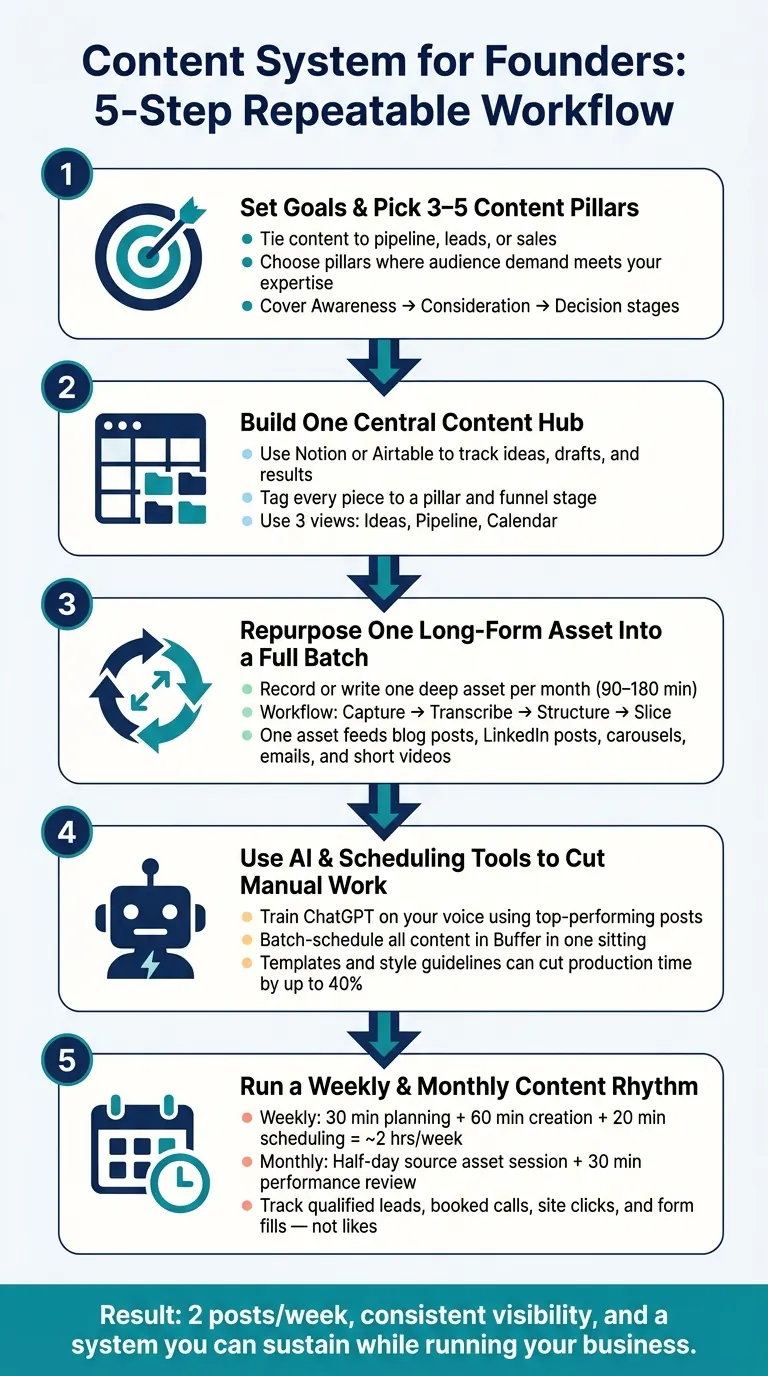
1. Set business goals and pick 3 to 5 content pillars
Define content goals that connect to revenue and pipeline
Before you open Notion or write a single word, get clear on why you're making content and how you'll know it's doing its job. Set measurable goals tied to revenue, pipeline, or conversions, such as generating 150 marketing-qualified leads (MQLs) per month or moving demo conversion rates from 2% to 3%.
If revenue is the goal, focus on content that supports the buyer journey through the decision stage. That means case studies, ROI tools, and other proof-based assets. A planned system also makes publishing more steady, which helps you track lead generation and repeat what works.
Turn business priorities into clear content pillars
Once the goal is clear, choose 3 to 5 content pillars and stay with them. Pick topics where audience demand, your offer, and your know-how meet. Keeping the list short helps your brand stay focused instead of drifting into every topic that seems loosely related.
For a consulting business built around AI agents, automation, and founder execution, a focused pillar set might look like this:
| Pillar | Funnel Stage | Content Purpose |
|---|---|---|
| AI Workflow Automation | Awareness | How-to content on replacing manual tasks |
| AI Agents for Startups | Consideration | Deep dives into agentic patterns and scaling operations |
| Founder Systems | Consideration | Strategy for content engines and business infrastructure |
| Founder Execution & Case Studies | Decision | Proof points that show how AI tools help move from idea to revenue |
Each pillar lines up with a stage in the buyer journey. Awareness content teaches. Consideration content shows your method. Decision content gives proof. A setup that covers all three stages does more work than one that only posts top-of-funnel tips.
Next, put those pillars into one central hub so planning stays simple.
Set brand guardrails once and reuse them
Write down your brand guardrails once, then use them again and again. Include your voice, key messages, proof points, and off-limits angles. In plain English: how you sound, what you stand for, and what not to say. Style guidelines and quality rules help AI drafts stay on brand and cut back on editing. Templates and style guidelines can cut production time by as much as 40%.
With goals, pillars, and guardrails in place, the next step is to keep everything in one content hub so the system stays organized.
1 Post Per Day Without Burnout - Complete Guide to Batching Content
2. Build one central content hub in Notion or Airtable
Once your pillars and guardrails are set, put every idea, draft, and asset into one central database tied to a pillar and a funnel stage. A single hub in Notion or Airtable keeps ideas, drafts, source assets, publish dates, and performance metrics in one spot. Every item should connect to one pillar and one funnel stage.
Why does this matter? Because scattered notes, loose docs, and half-finished drafts slow everything down. One home for your content makes the whole process easier to run.
The minimum fields needed to keep content organized
You don't need a big, fancy setup. A lean database with the right fields is enough to keep things on track without becoming a second job. Here's the minimum to get started:
| Field Name | Purpose |
|---|---|
| Pillar | Tags content to one of your 3–5 core themes |
| Format | Defines the medium: blog, short video, carousel, newsletter |
| Funnel Stage | Labels the intent: Awareness, Consideration, or Decision |
| Source Asset | Links to the raw video footage, transcript, or research doc it came from |
| Status | Tracks progress: Idea → Drafting → Review → Scheduled → Published |
| Publish Date | Sets the deadline (use US format consistently: Jul 26, 2026) |
| CTA | Notes the specific action you want the reader to take |
| Performance | Tracks clicks, leads, or conversion data after publication |
That’s it. No maze of properties. No overbuilt system you’ll stop using after two weeks.
Use three views: ideas, pipeline, and calendar
Three views are enough for most teams.
An Ideas view works as a simple list or gallery where raw brainstorming, customer questions, and rough topics get saved for later. A Pipeline view shows each piece moving from Idea to Published, so nothing gets stuck in limbo. A Calendar view lays out your posting rhythm by week or month, which makes schedule gaps easy to spot before they turn into missed publishing windows.
A simple setup is easier to keep up with. Start with these three views and hold off on adding more until the system feels smooth.
Turn the hub into a reusable content library
Over time, the hub becomes more than a planning tool. It turns into a working library.
Tag published assets as Evergreen when they can be reused without feeling old. Old webinar recordings, sales call notes, and long-form posts that did well can all go back into rotation with a quick status change instead of a full restart.
You can also build a "Fast Lane" view inside the database. Think of it as your ready-to-go shelf: a filtered list of plug-and-play visuals and captions for busy weeks when making something new just isn’t happening.
Linking each content piece back to its source asset also speeds up repurposing. You can see exactly which webinar, transcript, or blog post a LinkedIn carousel came from, then go back to that source when it’s time to make the next batch. One source asset can feed several formats later without forcing you to dig through old folders.
Once the hub is in place, turning one strong asset into multiple posts gets a lot faster. The next move is using one long-form asset to produce a full batch.
3. Repurpose one long-form asset into a full content batch
Create one deep asset, then turn it into multiple posts. One strong source piece each month can cover most of your calendar. Tie each source asset to one pillar and one business goal. Then store it in your content hub and use it as the base for a full batch.
Pick a pillar asset format you can produce consistently
Choose a format you can finish in a 90- to 180-minute block. Good pillar assets include a deep-dive blog post, a recorded webinar, a founder memo, or a recorded strategy session. Pick the format that lines up best with your strongest pillar.
Follow a repeatable workflow: capture, transcribe, structure, slice
Once your source asset is ready, use the same four-step process every time:
- Record the session or write the long-form piece in full.
- Use an AI tool to turn the audio or video into text.
- Read through the transcript and pull out the strongest standalone points.
- Turn each point into smaller assets like LinkedIn posts, short video clips, quote cards, carousels, or email snippets.
Run that loop once a month, and you’ll have enough material to stay consistent without starting from scratch every week.
Match each content format to a specific business goal
Each format should do one job. One source asset can support awareness, nurture, and conversion inside the same system. If time gets tight, use the table below to decide what to do first.
| Content Format | Primary Goal | Best Use | Priority When Time Is Tight |
|---|---|---|---|
| Long-form Blog Post | Search & Authority | Deep dives into core expertise | High |
| Email Newsletter | Nurture & Retention | Direct follow-up with leads and subscribers | High |
| Case Study / Testimonial | Decision & Conversion | Proving results to warm prospects | High |
| LinkedIn Posts | Visibility & Trust | Quick opinions and tips from the source asset | Medium |
| Short Video | Reach & Engagement | Hook new audiences with a single insight | Medium |
| LinkedIn Carousel | Engagement | Breaking down a framework into visual slides | Medium |
"A true content engine isn't a calendar full of posts - it's a strategic ecosystem that fuels consistent growth, authority, and revenue." - Vinodh Ramakannan, Founder & CEO, Spinta Digital
"A true content engine isn't a calendar full of posts - it's a strategic ecosystem that fuels consistent growth, authority, and revenue." - Vinodh Ramakannan, Founder & CEO, Spinta Digital
When capacity is low, focus on the high-priority formats first: long-form blog posts, email newsletters, and case studies. Those pieces do the heavy lifting. The rest can come later when you have more bandwidth. Once the batch is ready, use AI and scheduling tools to draft and publish it faster.
4. Use AI and scheduling tools to cut manual work
Once your batch is ready, the goal is simple: publish it without adding more hours to your week. AI and scheduling tools take care of the repeat tasks, so you stay in the editor seat instead of getting stuck in production.
Draft content faster with ChatGPT or AI agents
The best way to use AI in your content system is to give it your voice first. Add your top posts, captions, and emails into ChatGPT before asking it to write. With that context, it can spin out post variations, rework copy for different formats, and suggest hooks that sound like you, all based on the source assets already saved in your content hub.
"Feed OpenAI your best-performing posts, captions, and emails. Now it writes in your voice. I have an entire prompt... to the point where your friends and family couldn't even tell the difference." - Patrick Frank, Founder, The Secret Sauce
"Feed OpenAI your best-performing posts, captions, and emails. Now it writes in your voice. I have an entire prompt... to the point where your friends and family couldn't even tell the difference." - Patrick Frank, Founder, The Secret Sauce
At that point, the founder’s job changes. You’re not staring at a blank page anymore. You’re editing, tightening, and approving. Clear templates and style guidelines can cut production time by up to 40%.
Schedule content in batches using Buffer
Once drafts are approved, load them into Buffer in one sitting. Set aside one weekly block or one monthly block, queue everything, and then leave it alone. Batch scheduling gets rid of the daily “what do I post today?” loop and turns publishing into an automatic process.
"Focus on creation once, distribution at scale, and automation relentlessly." - Patrick Frank, Founder
"Focus on creation once, distribution at scale, and automation relentlessly." - Patrick Frank, Founder
This setup works even better when you have a reusable asset library: a shared set of graphics, photos, B-roll, and evergreen captions that can pair with new drafts. When your team is stretched thin, you can pull from that library instead of starting from zero. Once the queue is loaded, the next move is simple: pick the weekly or monthly posting rhythm that matches your capacity.
Track only the metrics that show the system is working
After drafting and scheduling, track only the numbers that show the system is helping the business. Likes and follower counts don’t tell you if content is bringing in revenue. A small group of signals tells a much clearer story:
- qualified leads
- booked calls
- website clicks
- lead form submissions
Structured templates and automated scheduling can cut production time, increase output, and support more qualified leads. Review performance each month so you can spot patterns over time instead of reacting to daily swings.
5. Run a simple weekly and monthly content rhythm
Once your system is in place, put it on a weekly and monthly rhythm. The idea is simple: manage content in weekly and monthly blocks, not day by day.
A sample weekly workflow for a busy founder
A realistic weekly planning block can fit into about 2 hours. Spend 30 minutes on Monday picking three topics for the week and tying each one to a pillar or format. Then set aside 60 minutes to batch captions, pull approved assets from your content hub, or record short pieces. Wrap up with 20 minutes to schedule everything in Buffer. After that, spend 10 minutes a day replying to comments and direct messages.
"Stop treating social media as a personal habit and start treating it as a small operating system: source material in, posts ready to approve, approved posts out." - Kathleen Celmins, Founder, Boomp
"Stop treating social media as a personal habit and start treating it as a small operating system: source material in, posts ready to approve, approved posts out." - Kathleen Celmins, Founder, Boomp
Use the weekly block to get the work done. Use the monthly block to refill the pipeline.
A sample monthly workflow for deeper content batching
Once a month, go deeper. On the first Monday, spend 60 minutes mapping out 12 posts across four content buckets - Authority, Proof, Personality, and Offers - so the month is planned before creation starts. Then run one half-day creation session: record a long-form asset and write a long-form post. That one session can feed your repurposing workflow for the next four weeks. End the month with a 30-minute review of leads, clicks, and inquiries to shape next month’s plan.
| Phase | Frequency | Time Block | Goal |
|---|---|---|---|
| Topic planning | Weekly | 30 minutes | Match 3 topics to pillars or formats |
| Batch creation | Weekly | 60 minutes | Write captions, pull assets, and record shorts |
| Scheduling | Weekly | 20 minutes | Load posts into Buffer |
| Source asset session | Monthly | Half-day | Produce 1 long-form asset to repurpose |
| Performance review | Monthly | 30 minutes | Track leads, clicks, and inquiries |
Conclusion: The system to keep, reuse, and improve over time
With that rhythm in place, the last step is to keep the system simple and repeatable. Start with clear business goals and 3 to 5 content pillars. Store everything in one hub. Repurpose one long-form asset into a full batch of posts. Use AI to draft faster and scheduling tools to publish on schedule. Then review results once a month and adjust.
That shift - from posting every day to running a system - is what makes content something a founder can keep up with while still running the business.
FAQs
How do I choose the right content pillars?
Choose content pillars by lining up your business goals with what your audience needs from you. Start with the outcomes your business needs this year, then look at the questions, pain points, and problems people expect you to help solve.
Next, review your top-performing posts from the past few months and look for patterns. Which topics keep coming up? Which themes get attention, replies, or lead people one step closer to working with you?
From there, pick three to five pillars. Each one should have a clear job, like educating your audience, building trust, or driving sales. If a pillar is tough to turn into weekly content, or it doesn’t help move people closer to hiring you, swap it out.
What if I only have one hour a week?
One hour a week can be enough if you stay consistent instead of trying to do too much at once.
Use that hour to make one core piece of content. That could be a short blog post or a video that answers a common client question.
Then reuse it across your channels. Pull out a few key lines or main takeaways, turn them into two or three social posts, and schedule everything in Buffer or Notion so it goes out automatically during the week.
How long should I test my content system?
Stick with your content system for at least 12 weeks before you decide whether it’s working.
A 30-day window can hint at early trends. But 12 weeks gives you a much steadier read on performance patterns and shows you what needs work.
During that stretch, keep your posting cadence steady. And instead of checking results every day, review them monthly.