
A small-business website costs a platform subscription if you build it yourself, or a project fee plus recurring bills if you hire a freelancer or agency. I’d choose based on what customers need to do on your site - not your company’s size.
- DIY: Best for a simple site when you can supply the content and handle updates.
- Freelancer: A fit when you need tailored design and can manage the brief and feedback.
- Agency: Worth considering for complex checkout, booking, or software connections.
Before paying, I’d compare the total first-year cost with the renewal budget: the build, hosting, domain, email, paid software, and maintenance. <u>Get the scope in writing</u>, including content, revisions, support, and account ownership. Add features only when they serve a clear customer need.
What Affects Website Costs?
Your build route and the work your site needs drive the price. Page count matters, but content, custom design, and software connections also affect the quote.
A service site needs pages, contact info, and a lead form. An online store adds products, checkout, inventory, and shipping rules.
Define What Your Site Needs
Before requesting quotes, list your pages, the main action visitors should take, and who will supply the text and images. Include content preparation and launch tasks. Missing copy or product details can delay the build.
Ask whether the quote includes template styling, mobile layouts, a working contact form, basic search engine optimization (SEO), and Google Analytics. Have the builder explain what “setup” covers and what you need to provide. Don’t assume any of these tasks are included.
Separate Must-Haves From Add-Ons
The more your site needs to do at launch, the higher the quote. Separate what you need now from what can wait. An add-on isn’t always optional: an online store needs payments at launch, while a service business may only need an inquiry form.
| Area | Basic scope to confirm | Possible add-on and its effect on the work |
|---|---|---|
| Design | Template styling and mobile layouts | Custom layouts, graphics, and animation add design and development work. |
| Copy and photos | You supply finished text and images | Professional writing and photography add production work. |
| Payments | No checkout for an inquiry-only site | Online sales add product setup, payment connections, and checkout testing. |
| Booking | Customers contact you for appointments | Online scheduling adds availability rules and setup. |
| Memberships | Public pages | Member accounts add login, access controls, and testing. |
| Integrations | Basic analytics setup | Connections to customer relationship management (CRM), inventory, or email software add configuration and testing. |
| Accessibility | Confirm whether accessibility checks are included | Dedicated prelaunch testing adds review and fixes. Specify what testing covers. |
For each feature, ask whether customers need it at launch. Defer what can wait.
With launch work defined, check which costs continue after your site goes live.
Decide Whether to DIY or Hire Help
Build the site yourself if the job is simple and you have time to maintain it. Hire help if the site needs complex features or the work would take you away from running your business.[5][8]
When DIY Is Enough
DIY can work for a simple informational site if you can provide the text and images and use a template with few changes. You’ll also need time to learn the platform and handle edits, updates, and security checks.[5][8]
Use the Founder’s Guide to Building a Simple Website That Converts to plan the work before you commit.
If you can’t meet those conditions, I’d hire help.
When to Hire a Freelancer or Agency
Hire help when your site drives most of your business, needs complex checkout or booking features, or must connect with other software. The same applies if building it would pull you away from running the business.[5][8]
| Factor | Freelancer | Agency |
|---|---|---|
| Scope | Template design and content loading for simple sites or work on a specific platform | Planning, design, development, content, and project management for complex stores, software connections, or multi-location sites |
| Owner workload | Moderate: explain the job and give feedback | Low: approve work and set the direction |
| Support | Direct contact with the builder, but limited backup if they’re unavailable | Team support, often with a monthly maintenance fee |
Patrick’s Customized Websites is listed at $5,000; confirm the current price, scope, and payment terms before setting your budget.[5][7]
Before work starts, put the job in writing.
Get a Written Scope
Your written scope should spell out the pages, copy, images, revision rounds, and software connections the builder will deliver and test. It should also name excluded work, fees for changes, support terms, and maintenance costs.[2][8]
Confirm that the domain, hosting, and site accounts will be registered in your business name - and that you’ll have full admin access.[2][8]
Plan for Costs After Launch
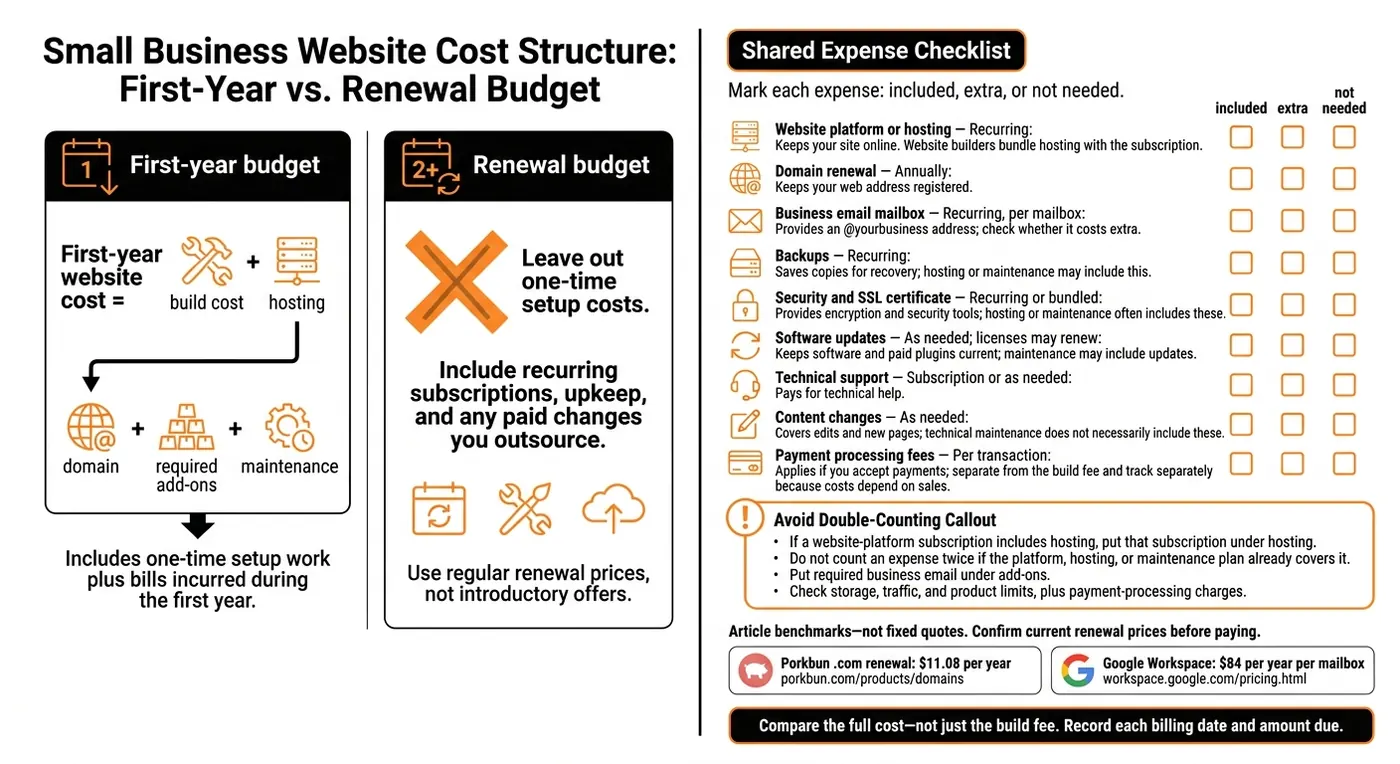
The build quote is only part of your website budget. Separate one-time setup costs from recurring bills, which most quotes exclude: hosting, domain renewals, business email, third-party plugin subscriptions, and maintenance.[2][7]
Those recurring bills add to what you spend in the first year.
Check Renewals, Maintenance, and Usage Fees
Before comparing quotes, mark each expense as included, extra, or not needed.
| Expense | When you pay | What it covers and whether it’s bundled |
|---|---|---|
| Website platform or hosting | Recurring | Keeps your site online. Website builders bundle hosting with the subscription. |
| Domain renewal | Annually | Keeps your web address registered. |
| Business email mailbox | Recurring, per mailbox | Gives you an @yourbusiness address. Check whether it costs extra. |
| Backups | Recurring | Saves copies of your site for recovery. Hosting or maintenance may include this. |
| Security and SSL certificate | Recurring or bundled | Provides encryption and security tools. Hosting or maintenance often includes these. |
| Software updates | As needed; licenses may renew | Keeps site software and paid plugins current. Maintenance may include updates. |
| Technical support | Subscription or as needed | Pays for technical help. |
| Content changes | As needed | Covers edits and new pages. Technical maintenance does not necessarily include these. |
| Payment processing fees | Per transaction | Applies if you accept payments. Separate from the build fee. |
For benchmarks, Porkbun .com renewal is $11.08 per year, and Google Workspace is $84 per year per mailbox.[2]
Treat those figures as budget references, not fixed quotes. Confirm current renewal prices with Porkbun and Google Workspace before paying. Check storage, traffic, and product limits, too, along with any payment-processing charges that could increase your bill.[7]
Calculate First-Year and Renewal Costs
First-year website cost = build cost + hosting + domain + required add-ons + maintenance.[2][7]
If your website-platform subscription includes hosting, put that subscription under hosting. Don’t count anything twice if your platform, hosting, or maintenance plan already covers it. Put required business email under add-ons. Track payment-processing fees separately because they depend on sales.[2][7]
Build a separate renewal budget using regular prices, not introductory offers. Leave out one-time setup costs. Include recurring subscriptions, upkeep, and any paid changes you outsource. Compare quotes using the full cost, not just the build fee.
Record each billing date and amount due. Then use the Startup Cost Calculator to fit website spending into your broader launch budget.
Conclusion: Pay for What Your Business Needs
Choose your build route based on your site’s scope and budget - not your company size. Compare first-year costs with renewal costs before you decide.[7][8]
| Business need | Best fit | Confirm before paying |
|---|---|---|
| Simple brochure site or idea test | DIY builder [7][8] | Renewal price, whether email is included, and whether the domain is in your name [2] |
| Service business needing custom design | Freelancer [7][8] | Pages, revision limits, and who supplies copy and photos [2][3] |
| Complex site with e-commerce or connections to outside systems | Agency [2][8] | Deliverables, system connections, and support terms [2][8] |
Before work starts, put the scope in writing. List the pages, revision limits, who provides content, system connections, deadlines, and support terms. Make sure the agreement spells out what the price covers.[2][3][8]
Check current prices, separate launch costs from upkeep, and skip features that don’t serve a clear business purpose.[3][6]
FAQs
How can I tell if a website quote is fair?
Compare quotes that cover the same work - not just the total price. Ask who will own and control the domain, hosting, and website accounts. Those accounts should be in your name [1].
Require an itemized scope that spells out the pages, features, and included rounds of changes [1][2][3]. Describe each feature in plain language so the quote matches what you expect the site to do [3].
Check what you’ll pay after launch, too: hosting, domain renewals, maintenance, and plugin subscriptions [1][4].
Can I upgrade a DIY website later?
Yes. Most platforms let you start with a basic plan and add features, such as e-commerce or more advanced tools, as your business grows.
If you switch from a website builder to WordPress, you can move your text and images and keep your domain. Plan to rebuild the design, though, because templates usually work only on the platform they were built for. Keep your domain registered in your own name so you retain control when you switch.
How do I know if my website is worth the cost?
Look beyond the upfront price. Add up your first-year expenses and account for the time you’ll spend building or managing the site. Then weigh that total against how well the site helps people find and trust your business.
Divide the quote by the professional’s hourly rate to estimate how much work it covers. A lower price isn’t always a better deal. The site also needs to fit your budget, skills, and goals - and be something you can maintain.