
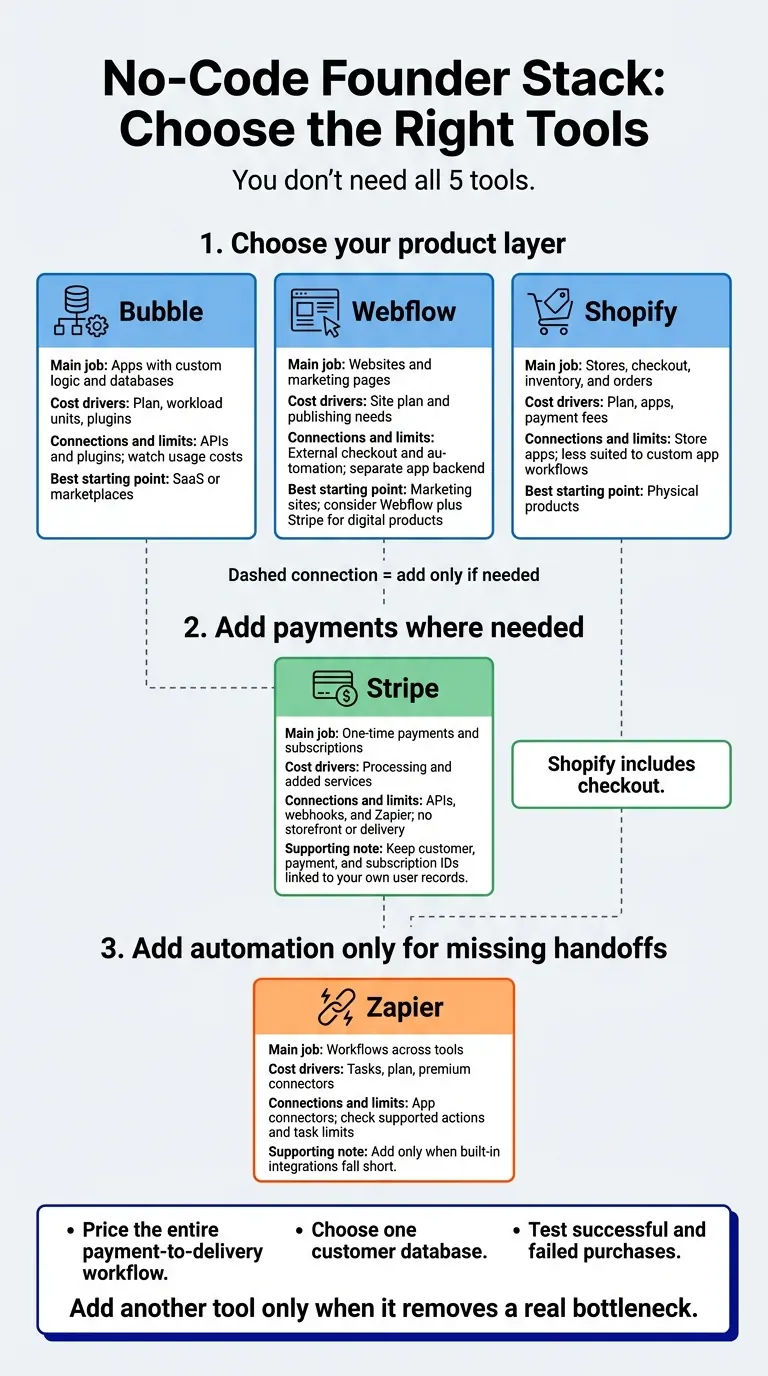
My advice: start with one tool for your product, then add payments and automation only where needed. I’d choose Bubble for a custom app, Webflow for a marketing site, or Shopify for a store. Stripe handles payments; Zapier connects tools when built-in integrations fall short.
You don’t need all 5 tools. I compare what each does, its cost drivers, how it connects, where customer data lives, and what can limit growth.
Quick Comparison
| Tool | Main job | Cost drivers | Connections and limits |
|---|---|---|---|
| Bubble | Apps with custom logic and databases | Plan, workload units, plugins | APIs and plugins; watch usage costs |
| Webflow | Websites and marketing pages | Site plan and publishing needs | External checkout and automation; separate app backend |
| Shopify | Stores, checkout, inventory, and orders | Plan, apps, payment fees | Store apps; less suited to custom app workflows |
| Stripe | One-time payments and subscriptions | Processing and added services | APIs, webhooks, and Zapier; no storefront or delivery |
| Zapier | Workflows across tools | Tasks, plan, premium connectors | App connectors; check supported actions and task limits |
For digital products, I’d consider Webflow plus Stripe, with Zapier only if delivery needs it. For SaaS or marketplaces, I’d start with Bubble and add payment support. For physical products, I’d start with Shopify.
Before spending, I’d <u>price the entire payment-to-delivery workflow</u>, choose one customer database, and test successful and failed purchases. Then I’d use the first 90 days to check handoffs, control usage costs, and improve the product - not pile on subscriptions.
1. Bubble
Product and Sales Features
Bubble fits app-first products that need logins, stored records, workflows, and dashboards. If you add AI features, track their usage separately and keep heavier logic outside Bubble.
Total Cost
Your budget needs to cover more than the plan: include Workload Units (WU), paid plugins, and Stripe/OpenAI usage. WU cover database operations, API calls, and workflows.
Live products usually need the Starter plan to use a custom domain. As usage grows, teams often move to Growth for larger WU limits and recurring backend workflows.
Integrations and Data Ownership
Connect Stripe and OpenAI through the API Connector or plugins. Use Zapier to automate forms, email, and database tasks.
Keep payment status and usage limits in the backend. Email verification and limits for unpaid users help cut abuse.
Growth and Migration Limits
Watch workload costs as usage grows. Add infrastructure only when Bubble’s limits become a bottleneck. If your product needs a lighter, site-first layer, the next section covers that path.
The BEST No Code App Builder in 2026 (I Tested Them All)
2. Webflow
If your business needs a website rather than an app, Webflow offers a lighter path.
Product and Sales Features
Webflow suits site-first businesses, including launch pages, content sites, and polished service sites. Before launch, test mobile layouts and page speed. Add payments and automation to round out your launch setup.
Total Cost
Budget about $20/month for a basic site plan. Pick the smallest plan that meets your publishing and content needs.
Integrations and Data Ownership
Use Zapier to send website leads to email, Notion, or Slack. If a separate tool handles checkout, test the entire purchase process before launch. Also decide where you’ll store customer data.
Growth and Migration Limits
Webflow handles the website, not the application backend. Authentication, billing, and CRM often need a separate backend.
If selling products is your main goal, move to the store-first option.
3. Shopify
Product and Sales Features
When selling is the main job, Shopify is the most straightforward store-first option. It suits store-first businesses and single-product stores that need built-in checkout, inventory, and order management.
Before launch, finalize your products and variants, inventory, discounts, shipping, and fulfillment. Selling digital products? Make sure buyers have a clear way to receive their files.
Total Cost
Budget for the plan, paid apps, payment processing, and transaction fees. A lean setup for a solo founder can stay around $0–$50 to start.
Integrations and Data Ownership
Connect Shopify with Zapier for automation, Klaviyo or Omnisend for email and SMS, and HubSpot for CRM. Set up post-purchase emails and SMS before launch.
If checkout needs to work outside the storefront, Stripe handles the payment layer next.
Growth and Migration Limits
Shopify works best for storefronts - not custom app logic or complex internal workflows.
4. Stripe
If your storefront is already in place, Stripe can handle the payments.
Product and Sales Features
Stripe handles payments, not the storefront. Use Checkout for one-time payments or subscriptions, Payment Links for a shareable buy-now link, and Billing for recurring revenue. Invoicing handles B2B billing, while Connect supports marketplace payouts.
You’ll still need landing pages, product delivery, lead capture, and user management.
For a simple digital product, start with Payment Links, then connect successful purchases to delivery through Zapier. For an app MVP, keep access and usage tracking in your backend.
Total Cost
Budget for processing fees, plus any webhook, email, or fulfillment costs.
Integrations and Data Ownership
Stripe webhooks or Zapier can trigger actions after a purchase, including automatic access updates. If you’re building a Bubble app, check that its Stripe integration supports the payment events you need.
Keep customer, payment, and subscription IDs linked to your own user records.
Growth and Migration Limits
Before launch, check verification requirements, payout timing, dispute handling, and failed-payment rules. For subscriptions or marketplaces, define account, seller, and compliance requirements before you scale.
Once payments are live, Zapier handles the automation that moves successful orders through the rest of your stack.
5. Zapier
Product and Sales Features
After checkout, Zapier moves data between your tools and triggers the next step, such as order routing, CRM updates, notifications, or fulfillment.
Connect tools that already work - don’t use Zapier to patch broken processes. For each automation, define the trigger, actions, filters, and fallback path. Handle launch-day email and SMS in your email platform first. Add Zapier only when the workflow needs to span multiple tools.
Total Cost
Zapier offers a free tier for basic automation. Before setting your budget, check task limits, premium app access, and overage fees. Estimate usage across every action, not just orders, and leave room for duplicate runs and retries.
Integrations and Data Ownership
A connector being available doesn’t mean it supports what you need. Check that it exposes the exact event or action your workflow requires.
Keep one CRM or database as your source of truth, and use Zapier to sync updates. If a workflow is unclear or breaks easily, simplify your stack before automating it.
Growth and Migration Limits
Before launch, test for delays, duplicate submissions, and failed steps. Document field mappings, and review workflows whenever permissions, fields, or connected apps change.
Pros and Cons: When to Choose Each Tool
Choose each tool for the job it handles, not just the features it offers.
| Tool | Advantages | Disadvantages and cost considerations | Best fit | Avoid when… |
|---|---|---|---|---|
| Bubble | Builds app logic, workflows, and databases. | Custom commerce takes extra build and maintenance work. A separate marketing site adds another subscription. | Products where the workflow itself is the product. | You only need a landing page or a standard online store. |
| Webflow | Gives founders design control over marketing sites. | Adds a second subscription and another site to maintain. | Marketing sites where brand control or separate publishing is worth another subscription. | Your existing Bubble or Shopify pages already meet your marketing needs. |
| Shopify | Combines a storefront, checkout, and brand presentation. | Doesn't replace custom app logic. Other tools need their own budget. | Businesses where shopping is the main workflow. | Your core product relies on custom app workflows rather than shopping. |
| Stripe | Adds checkout without making you build the payment system. | Doesn't handle pages, fulfillment, or product delivery. | Products or sales flows where payments are the missing piece. | You expect a payment tool to run the whole business. |
| Zapier | Automates handoffs between tools. | Setup and maintenance work grows as you add connections. | Established workflows that span multiple apps. | A native integration already handles the job. |
Add another tool only when it removes a real bottleneck.
Next, match the right stack to your business model.
Recommended Stacks by Business Model
Choose tools that fit your business model - not a business model that fits your tools.
| Business model | Recommended stack | System of record | Launch checks |
|---|---|---|---|
| Digital products and consulting | Webflow + Stripe + Zapier. Add Notion for delivery and records, or HubSpot if you need a dedicated CRM. | Notion or HubSpot for customers and projects; Stripe for payments. | After payment, deliver through a Notion page, Google Drive link, or direct link. Test the handoff from payment to automation to delivery before launch. |
| SaaS MVPs | Webflow + Bubble + Stripe + Zapier. Use Bubble for the app and Webflow for marketing. | Supabase for user data and token usage; Bubble for app logic. | Before building, map email validation, automated account creation, Stripe payment, and token tracking. |
| Physical products | Shopify + Zapier. Start with Shopify. Add Zapier where logistics or marketing handoffs need it. Klaviyo is optional for retention workflows. | Shopify for orders and customers; Klaviyo for retention activity. | Set up fulfillment and preloaded email/SMS flows. |
| Marketplaces | Webflow + Bubble + Stripe Connect + Zapier. Use Bubble for users and marketplace logic. Add an external database, such as Supabase, if needed. | Bubble or Supabase for marketplace records; Stripe Connect for multi-party payments. | Map user onboarding and payment routing first. |
Once you choose your stack, price the full workflow, not just the core subscription. Use these estimates for planning, and check current pricing for any tool without a listed rate.
Keep the Stack Lean
Start with one product layer, one payment layer, and only the automations that affect revenue. Before adding software, label each task automate, delegate, or delete.
Final Verdict: Start With the Smallest Reliable Stack
After matching tools to your model, use this check to trim your stack before launch.
| Platform | Choose it for | Cost driver | Integration point | Main limitation |
|---|---|---|---|---|
| Bubble | Custom app workflows | Workload units and app complexity | API Connector and plugins | Steep learning curve for non-developers |
| Webflow | Marketing pages and websites | Site plan and monthly traffic | Zapier / Webflow Logic | Limited support for complex backend logic |
| Shopify | Retail storefronts | Subscription, apps, and transaction fees | Shopify App Store | Rigid structure for non-retail products |
| Stripe | Checkout and payments | Transaction volume | Stripe API or Checkout | Account holds or freezes in higher-risk niches |
| Zapier | Cross-tool automation | Task volume | App connectors and webhooks | Can get very expensive at high scale |
Compare the full workflow - not just the starter price. Rule out tools that add cost without solving a bottleneck.
Before launch: Define your offer, price, delivery promise, and system of record. Estimate monthly usage, then confirm that each connector supports the triggers and actions you need.
Before accepting payments: Set up checkout, automate delivery, and test both successful and failed purchases.
Manage your first 90 days in three phases:
- Days 1–30: Launch and verify that payment-to-delivery handoffs work.
- Days 31–60: Stabilize integrations, fix broken handoffs, and review usage costs.
- Days 61–90: Refine the product and expand distribution.
Publication check: Recheck plan names, connector availability, feature limits, billing frequency, and usage caps before publishing or committing to a plan.
FAQs
How can I avoid paying for duplicate features?
Choose tools that match your business’s current stage - not whatever software is getting the most buzz. Keep your MVP lean. Adding features too soon makes it harder to manage and increases the risk of duplicating functionality. Put your time into testing assumptions and gathering user feedback.
Review your tools regularly for overlap. Let your stack grow with your business rather than piling up subscriptions you don’t need.
What happens if payment succeeds but delivery fails?
If payment goes through but delivery fails, be ready to give the customer a full refund. For pre-launch plans or paid pilots, state your delivery timeline clearly and promise a full refund if the project doesn’t move forward as planned.
Being upfront helps protect customer trust and your reputation as you test your product and work through technical issues in your automated sales and delivery stack.
Can I move my customer data if I outgrow my tools?
Yes. Platforms like Lovable and Bolt let you export projects to GitHub, helping you avoid lock-in. Replit gives you full ownership of your codebase from the start, making it the easiest to migrate when you need more control.
Supabase is built to scale. If you outgrow your stack, you can tune performance, split your system into modules, or move specific components to custom code.